
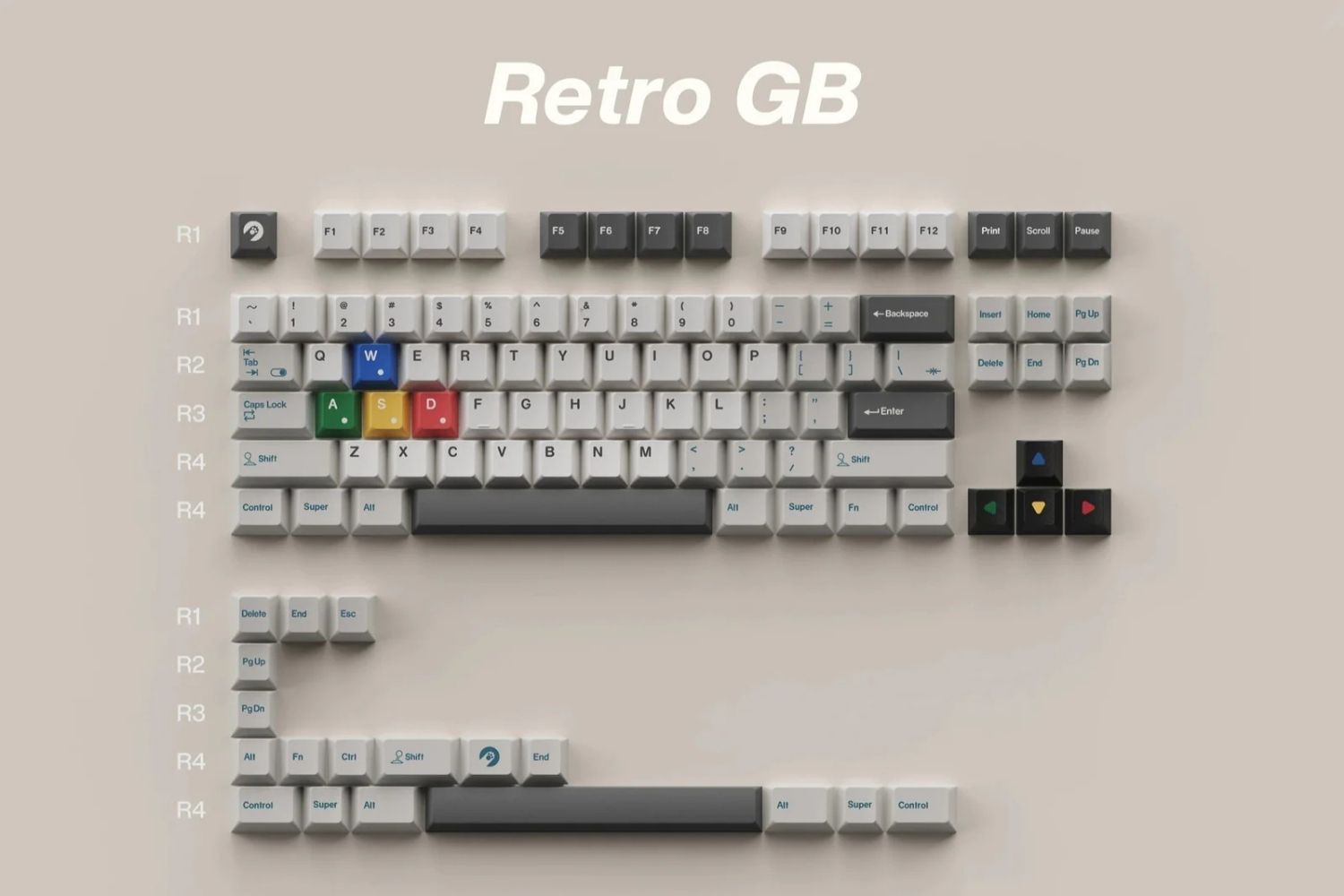
Keycaps determine how your keyboard looks, sounds, and feels — and the differences between sets go well beyond color. Profile, height, material, and printing method all shape the typing experience in ways that aren't obvious until you've tried a few options. This guide covers what you need to know to make an informed choice, whether you're buying your first set or upgrading a custom build.
What Are Keycap Profiles?
A keycap profile is the overall shape and height of a keycap — how tall it sits, how the top surface is angled, and how it varies across different keyboard rows. Profile affects how your fingers land on each key, how much travel your hands make during a session, and how the keyboard sounds.
Getting the profile right makes a bigger difference to daily comfort than most buyers expect — it's one of the most impactful upgrades you can make. Angry Miao's keycaps collection covers a range of profiles and materials for different build styles.

Sculpted vs Uniform Profiles
Sculpted profiles vary the height and angle of keycaps across each row, following the natural arc of the fingers. The bottom row sits lower and at a different angle than the top row — this ergonomic design is what most typists find comfortable for long sessions.
Uniform profiles keep every keycap the same height and shape across all rows. They're easy to rearrange, which suits ortholinear layouts or users who swap keycap positions frequently. The tradeoff is less ergonomic guidance — your fingers land on a flat plane rather than a contoured surface.
The Main Keycap Profiles
The top surface of a keycap is either cylindrical (curved front-to-back, like a half-pipe) or spherical (curved in all directions, like the inside of a bowl). Both affect how the fingertip centers on the key.
Cherry
Medium-height sculpted profile at ~9.4mm. Cylindrical top surface, slight backward angle. The most popular profile among enthusiasts — low enough for comfort over long sessions, with clear row-to-row variation for positional feedback. Best for: typing, general use.
OEM
The most common profile on mass-produced keyboards is ~11.9mm. Slightly taller than Cherry with a similar cylindrical design. Most people have typed on an OEM without realising it. Widely available and compatible with almost every keyboard. Best for: general use, stock keyboard replacement.
SA
One of the tallest profiles at ~16.5mm with a spherical top surface. Deep bowl-shaped keys, retro aesthetic, and a resonant "thocky" sound. Requires an adjustment period — wrist position and finger travel both change noticeably. Best for: enthusiasts, collectors, and vintage keyboard aesthetic.
MT3
Inspired by vintage IBM terminals at ~16mm. Deeper and more aggressively concave spherical tops than SA, which guides the fingertip precisely to the center of each key. Primarily available through Drop. Best for: typists who prioritise accuracy, retro fans.
DSA
Low uniform profile at ~7.6mm with a spherical top. Every key is the same height — the go-to for ortholinear layouts. Less finger travel and a flatter feel. Best for: ortholinear keyboards, flat layout preference.
XDA
Uniform profile at ~9.1mm with a wider cylindrical top surface than DSA. Slightly more forgiving for typing while maintaining a clean, modern uniform look. Best for: aesthetics-first builds, fast typing.
Profile Comparison at a Glance
|
Profile |
Type |
Height |
Top Surface |
Best For |
|
Cherry |
Sculpted |
~9.4mm |
Cylindrical |
Typing, general use |
|
OEM |
Sculpted |
~11.9mm |
Cylindrical |
General use |
|
SA |
Sculpted |
~16.5mm |
Spherical |
Enthusiasts, retro |
|
MT3 |
Sculpted |
~16mm |
Spherical (deep) |
Accuracy, retro |
|
DSA |
Uniform |
~7.6mm |
Spherical |
Ortholinear |
|
XDA |
Uniform |
~9.1mm |
Cylindrical (wide) |
Aesthetics, fast typing |
Keycap Size
Layout
Keycap sets are designed around specific layout standards. The two most common are ANSI and ISO.
ANSI is the US standard — wide rectangular Enter key, long left Shift, 104 keys on a full-size board. The overwhelming majority of enthusiast keycap sets are ANSI.
ISO is common in Europe and the UK — L-shaped Enter key, shorter left Shift, one extra key between Shift and Z, 105 keys total. ISO-compatible sets exist but the selection is significantly narrower.
Compact layouts like 65%, 75%, and TKL have their own modifier arrangements. Always confirm a set covers your specific layout's key sizes — particularly the bottom row, which varies between manufacturers.
Size
Individual keycap sizes are measured in units (u), where 1u equals one standard alphanumeric key width.
|
Key |
Typical Size |
|
Standard alphanumeric |
1u |
|
Tab |
1.5u |
|
Caps Lock |
1.75u |
|
Left Shift (ANSI) |
2.25u |
|
Backspace |
2u |
|
Enter (ANSI) |
2.25u |
|
Spacebar |
6.25u (most common) |
Some 60% and 65% boards use non-standard spacebar widths (6u, 6.5u, 7u) or split spacebars. Check your keyboard's specifications before purchasing.
Keycap Materials: ABS vs PBT
ABS (Acrylonitrile Butadiene Styrene) is smoother, lighter, and less expensive. It's the material used on most stock keycaps. ABS develops a shine over time from finger oils — a polished feel most users find unpleasant after a few months. On the upside, ABS is easier to produce in vivid colors and works well with double-shot legends.
PBT (Polybutylene Terephthalate) is denser, rougher in texture, and significantly more resistant to shine. PBT holds its matte finish much longer under daily use. It's more expensive but worth it for any custom keyboard build where long-term feel matters. Modern PBT sets have largely resolved the early limitations around color range and legend printing.
|
ABS |
PBT |
|
|
Texture |
Smooth |
Matte, rougher |
|
Shine over time |
Develops quickly |
Resistant |
|
Durability |
Lower |
Higher |
|
Price |
Lower |
Higher |
|
Best for |
Budget sets, vivid colorways |
Daily drivers, long-term builds |

Keycap Printing Methods
Double-Shot
Two separate layers of plastic are molded together — one for the legend, one for the keycap body. The legend is a physical part of the keycap and cannot wear off. Double-shot is the most durable printing method and allows RGB backlighting to shine through the legend clearly. Available in both ABS and PBT.
Dye-Sublimation
Heat transfers dye directly into the keycap material. Legends become part of the plastic rather than sitting on top — they won't crack or peel. Limited to printing darker colors on lighter keycaps, and only works on PBT. Produces a clean, flat look popular in high-quality PBT sets.
Pad Print
Ink is applied directly onto the keycap surface. The least expensive method and the least durable — legends wear off with heavy use over time. Most common on budget keyboards. Worth avoiding for daily drivers if better options are available.
How to Choose the Right Keycaps
Profile and height first. For sustained typing, a sculpted profile feels more natural — Cherry at 9.4mm is the safest starting point. SA and MT3 at 16mm+ require adjusting wrist position. For ortholinear boards or flat aesthetics, DSA or XDA. The keycap profiles guide covers height differences across all profiles in detail.
Material for longevity. PBT holds up significantly better under daily use. If you're investing in a set for a keyboard you'll use for years, PBT is the right call. ABS works on a budget or when a specific colorway isn't available in PBT.
Printing for durability. On PBT, look for dye-sublimation or double-shot. On ABS, double-shot. Avoid pad-printed sets for daily drivers.
Compatibility last. Confirm the set covers your layout standard (ANSI or ISO), that the bottom row sizes match your board, and that the profile height works with your switches. For something more distinctive, artisan keycaps offer individual statement pieces that mix into any build — check stem type and size before buying.

Conclusion
Profile, height, material, and printing method each affect the typing experience independently. Cherry or OEM with PBT double-shot is the most practical starting point for most builds. From there, experimenting with SA or MT3 for different acoustics, or DSA for ortholinear use, is part of what makes custom keyboards worth building.
FAQ
Do keycaps fit any keyboard?
Not universally. Compatibility depends on switch stem type, layout standard (ANSI or ISO), and profile. Always check that the set matches your keyboard's layout and bottom row sizes.
Is PBT always better than ABS?
For durability and texture, yes. ABS has a wider color range and costs less — useful when budget or specific colorways matter more than longevity.
Can I mix keycap profiles on one keyboard?
Technically, yes, but mixed profiles create inconsistent heights across rows and disrupt typing rhythm. Most users stick to one profile per board.
What does double-shot mean?
Two layers of plastic are molded together — one for the legend, one for the body. The legend is physically part of the keycap and cannot wear off.
What is the most comfortable keycap profile?
Cherry and OEM are the most accessible starting points. MT3 is frequently cited as the most ergonomic for sustained typing. Comfort depends on hand size, grip, and typing habits.
WRITTEN BY
Angry Miao
Gaming Mouse Specialist • Angry Miao Editorial Team
-
-
-
-
More articlesShare:
Types of Keyboards: Which One Is Right for You?
Can Any Wireless Mouse Work with a MacBook? Setup Guide