
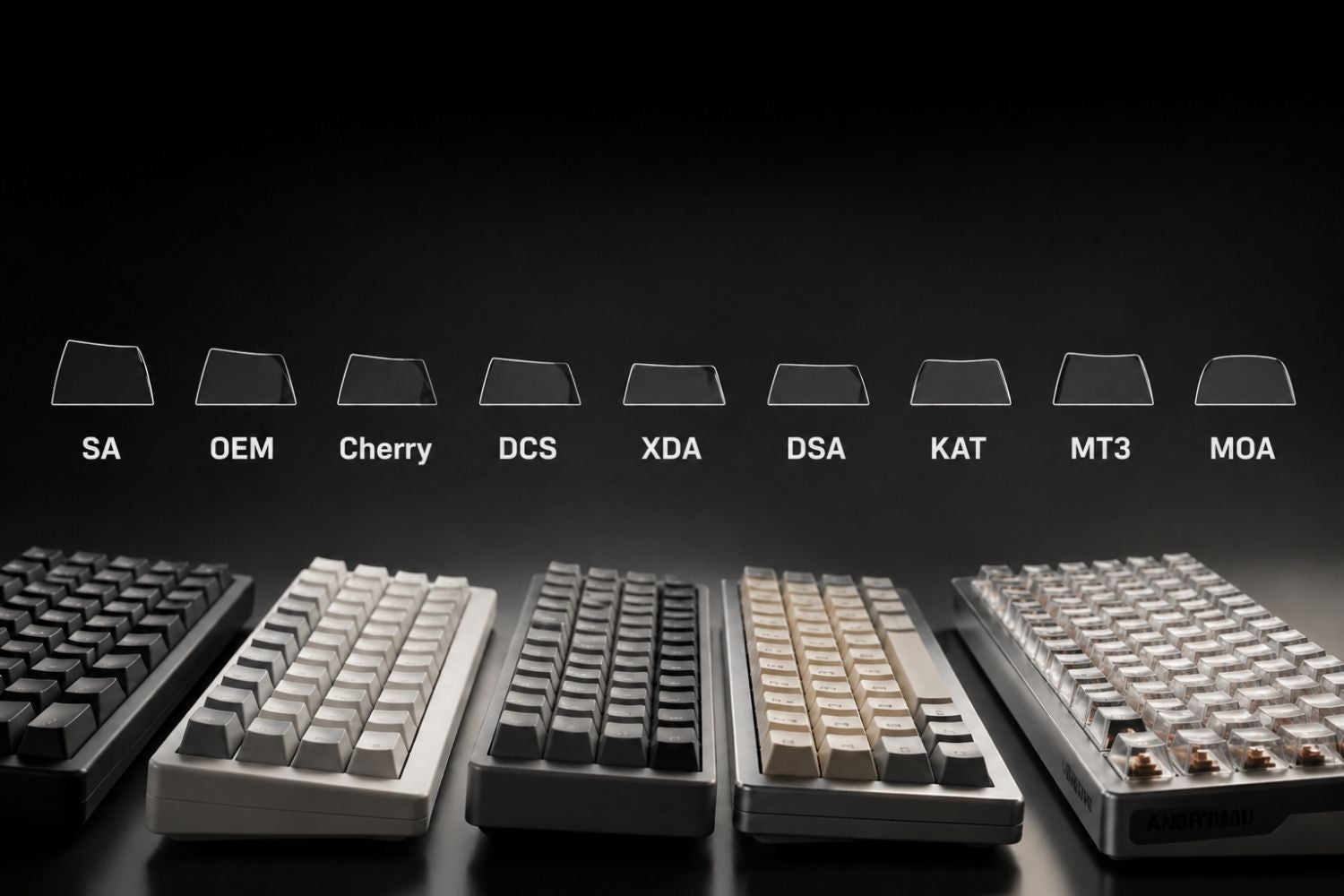
Keycap profiles come in a range of heights and shapes — OEM, Cherry, SA, XDA, DSA, KAT, and ASA are the most common. Choosing the right one affects typing comfort, gaming accuracy, and how your keyboard sounds. Below is a full breakdown of each profile and how to find the one that fits your setup.
What Are Keycap Profiles?
A keycap profile refers to the overall shape and height of a keycap set — not just a single key, but how the entire keyboard looks and feels from the side. Two things define a profile: height and row type.
Height determines how far your fingers travel to reach each key. Profiles range from ultra-low chiclet caps at 2–5mm to tall SA keycaps at 16.5mm.
Row type refers to whether each row shares the same shape or varies across the board.
Sculpted Profiles
Each row has a slightly different height and angle, following the natural arc of your fingers across the keyboard. OEM, Cherry, and SA are all sculpted.
Uniform Profiles
Every key shares the same height and angle, regardless of row — easy to swap keycaps between positions without visual or tactile inconsistency. XDA, DSA, and KAM are uniform profiles.

Why Does Keycap Profile Actually Matter?
Most people who build or buy custom keyboards spend time choosing switches and layouts but don't think much about keycap profiles. The profile affects two things directly:
Typing comfort. Taller profiles with deeper finger wells — like SA — give your fingertips a pronounced resting position on each key. Lower profiles like Cherry require less finger extension, which can reduce fatigue during long sessions.
Gaming accuracy. Clearly defined key edges help you locate keys by feel without looking down. Cylindrical and spherical profiles both create edges that your fingertips can register, which matters when pressing WASD repeatedly or reaching for ability keys under pressure.
Sound. Taller keycaps produce more resonant, deeper sounds. Shorter profiles tend to sound tighter and more controlled. This is why SA and KAT sets are popular among enthusiasts who want a pronounced "thock," while the Cherry profile is a common choice for quieter, focused setups.
The Main Keycap Profiles Explained
OEM Profile

- Height: ~10.5mm
- Surface shape: Cylindrical
- Row type: Sculpted
OEM is the default profile on most pre-built mechanical keyboards — if you've typed on a standard gaming keyboard without knowing its profile, it was almost certainly OEM. Medium height, cylindrical top, mildly sculpted rows. Versatile and beginner-friendly, though enthusiasts often consider Cherry a more refined alternative.
Best for: General use, gaming, first-time keyboard buyers.
Cherry Profile

- Height: ~9.81mm
- Surface shape: Cylindrical
- Row type: Sculpted
Cherry profile is shorter than OEM with a subtler row-to-row sculpt — cleaner looking from the side, equally ergonomic. It's the most popular profile in the custom keyboard community, striking a balance between comfort, aesthetics, and wide aftermarket availability. The shorter height reduces finger travel per keystroke, which adds up over long sessions. If you're building or upgrading a board, the custom keyboard lineup at Angry Miao is a good place to see Cherry profile in practice.
Best for: Typing, general use, custom keyboard builds.
SA Profile

- Height: ~11.9mm
- Surface shape: Spherical (concave)
- Row type: Sculpted
SA is one of the tallest profiles at 16.5mm, with a pronounced concave scoop on each key that cradles the fingertip. The tall height and heavy sculpting give SA sets a distinctive retro aesthetic, and the sound profile is deep and resonant. The trade-off is ergonomics — most SA users pair them with a wrist rest. SA is also the profile most associated with artisan keycaps; if that side of the hobby appeals to you, an Artisan Keycap is one of the most visually striking ways to personalise a board.
Best for: Retro aesthetics, enthusiast collectors, users who prioritise sound and feel over low fatigue.
XDA Profile

- Height: ~9.56mm
- Surface shape: Spherical (slightly concave)
- Row type: Uniform
XDA is a low-to-medium height uniform profile with a wide, slightly concave top. Every row shares the same height and angle, making it ideal for non-standard layouts — any key can go in any row without inconsistency. The wide surface gives more fingertip contact per key, though users coming from sculpted profiles may miss the row-to-row guidance.
Best for: Ortholinear keyboards, non-standard layouts, users who prefer uniform feel.
DSA Profile

- Height: ~7mm
- Surface shape: Spherical
- Row type: Uniform
DSA sits below XDA in height with the same uniform row type. The spherical top has a slight concave dip for fingertip guidance without sculpting. Lower height reduces the visual bulk of the board significantly and keeps it flexible for remapping and custom layouts.
Best for: Low-profile aesthetics, Dvorak/Colemak users, compact builds.
KAT Profile

- Height: ~13.5mm
- Surface shape: Spherical
- Row type: Sculpted
KAT sits between Cherry and SA at ~13.5mm, with a spherical top and a smooth, satiny PBT finish that's widely praised. It delivers much of SA's acoustic depth and tactile character at a more practical height — most users can type on KAT without a wrist rest. KAM is the uniform version, applying the same shape to every row.
Best for: Users who want SA-like sound and feel at a more practical height.
ASA Profile

- Height: ~11.81mm
- Surface shape: Spherical
- Row type: Sculpted
ASA is Akko's hybrid between OEM and SA — spherical concave tops at a more manageable height. It delivers the visual presence and premium sound of SA without the extreme wrist angle, and is commonly available in budget-friendly sets. A practical entry point into high-profile keycaps.
Best for: Users who want the SA look and sound at a more ergonomic height.
Keycap Profile Comparison
Whether you're just getting started or looking to upgrade, browsing a range of keycaps across different profiles is the fastest way to understand what's available before committing to a set.
| Profile | Height | Surface | Row Type | Best For |
|---|---|---|---|---|
| Chiclet | 2–5mm | Flat | Uniform | Laptops, ultra-low profile |
| DSA | ~7.6mm | Spherical | Uniform | Compact builds, custom layouts |
| XDA | ~9.1mm | Spherical | Uniform | Ortholinear, non-standard layouts |
| Cherry | ~9.4mm | Cylindrical | Sculpted | Typing, custom builds, general use |
| OEM | ~11.9mm | Cylindrical | Sculpted | Pre-built keyboards, beginners |
| MDA | ~12mm | Spherical | Sculpted | Ergonomic comfort, wide landing |
| ASA | ~13.5mm | Spherical | Sculpted | SA look at practical height |
| KAT | ~13.5mm | Spherical | Sculpted | Premium typing feel, thocky sound |
| SA | ~16.5mm | Spherical | Sculpted | Retro aesthetics, maximum thock |
How Does Keycap Profile Interact with Keyboard Layout?
Sculpted profiles have different key heights per row — a Row 1 key placed in Row 3 will look and feel wrong. When buying keycaps for a compact or non-standard board, make sure the set includes the right keys for your specific rows. Uniform profiles like XDA and DSA sidestep this entirely. Understanding your keyboard layout before choosing a profile saves you from buying a set that doesn't cover all your keys.
Which Keycap Profile Is Right for You?
For Typing and Office Use
Cherry profile is the most practical starting point for long typing sessions — lower height reduces finger extension, and the mild sculpting guides fingers naturally between rows. MDA is worth considering if you prefer a wider landing area per key. SA and KAT work for office use if aesthetics and sound are priorities, but both benefit from a wrist rest. XDA's uniform rows are the easiest option for non-standard or remapped layouts.
For Gaming
OEM and Cherry are the most practical for gaming — both have cylindrical tops with clear key edges that help locate keys by feel under pressure. Cherry's lower height also means slightly less finger travel per keypress. SA and KAT are rarely used competitively; the extra height slows rapid key transitions. A well-matched profile on a quality mechanical gaming keyboard makes extended gaming sessions noticeably more comfortable — Cherry profile on a custom build is worth trying if you haven't.
Conclusion
Keycap profiles are personal — OEM is the universal default, Cherry refines it, SA and KAT push toward maximum sound at the cost of height, XDA and DSA trade sculpting for flexibility. If you need a starting point, the Cherry profile is where most enthusiasts land after experimenting.
FAQ
Can I put any keycap profile on any keyboard?
Yes, as long as the keycap uses an MX-compatible stem. The profile doesn't affect switch compatibility, though very tall profiles like SA may look awkward on low-profile cases.
Is Cherry profile the same as Cherry MX?
No. Cherry profile is the keycap shape. Cherry MX is the switch underneath. The two are independent — you can mix and match freely.
Which profile is best for gaming?
OEM and Cherry are the most common. Both have cylindrical tops with clear key edges for locating keys by feel. SA and KAT are rarely used for gaming due to their height.
Do keycap profiles affect typing speed?
Subtly. Lower profiles require less finger movement, and sculpted profiles guide fingers between rows more naturally. Comfort and familiarity matter more than the profile itself.
What is the most common keycap profile?
OEM overall, found on most pre-built keyboards. Cherry profile is most common in the custom keyboard community.
WRITTEN BY
Angry Miao
Gaming Mouse Specialist • Angry Miao Editorial Team
-
-
-
-
More articlesShare:
The Best Lightweight Mouse of 2026: Weight and parameters
Wireless vs Wired Mouse: Speed & Performance for Gaming