
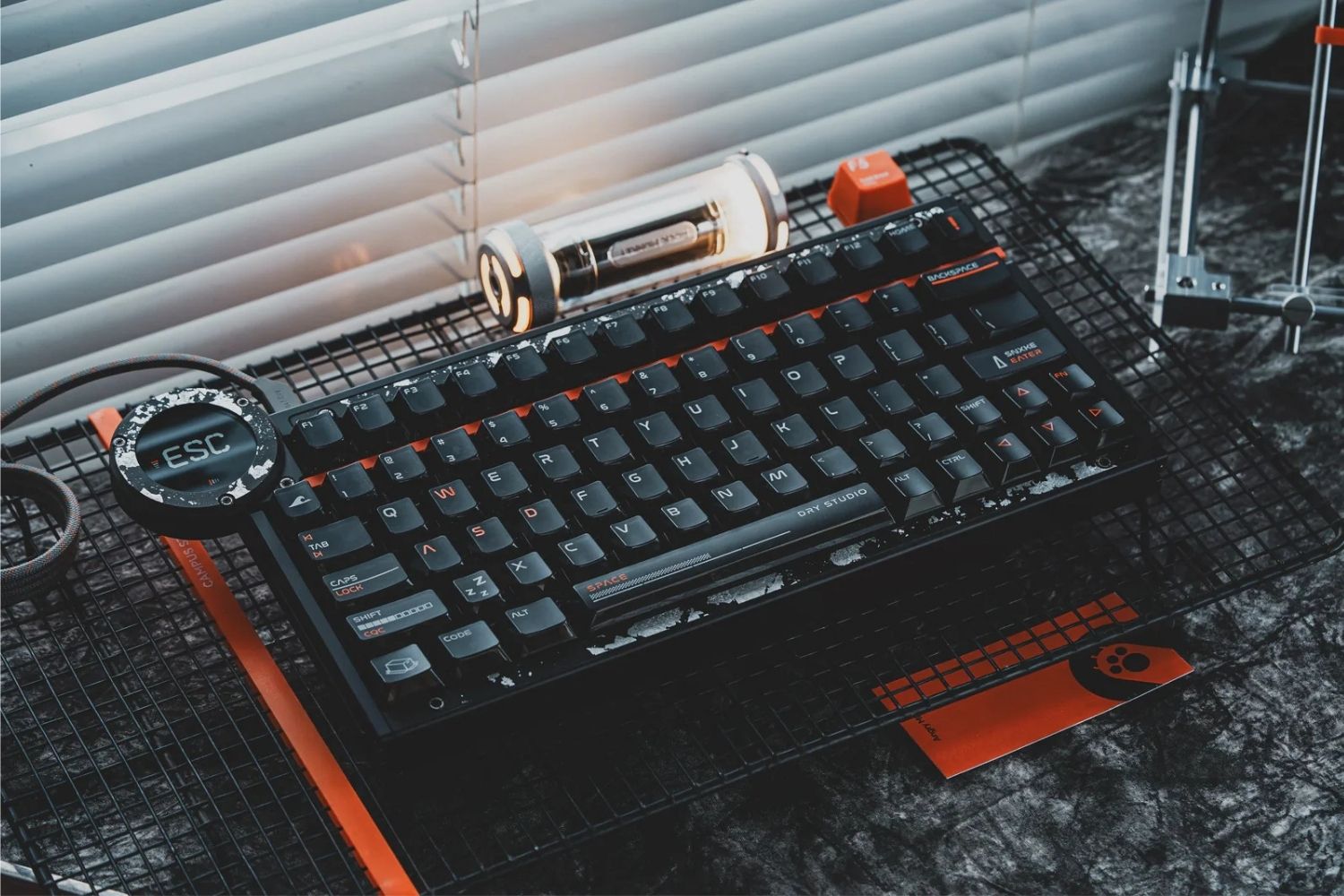
The best gaming keyboard is not the same for every player. Competitive FPS players may want Hall Effect speed, Rapid Trigger, and low input delay. MMO and strategy players may need more physical controls. Custom keyboard fans may care more about typing feel, sound, layout, and build quality. This guide compares 10 gaming keyboards for different games, budgets, desk setups, and daily-use needs.
What to Look for in a Gaming Keyboard
Switch Type and Actuation
Switch type should come before RGB or brand name. A gaming keyboard with Hall Effect or magnetic switches can support adjustable actuation and Rapid Trigger. A mechanical keyboard usually offers more switch variety, stronger typing character, and a more traditional custom feel.
Layout and Desk Space
Layout affects both gaming comfort and daily use. Full-size keyboards keep every key but take more room. TKL, 80%, and 75% layouts save space while keeping important controls. A 65% or 60% board gives more mouse room but depends more on layers and shortcuts.
Polling Rate and Input Response
For most players, 1,000Hz is already usable. Higher 4K or 8K polling can improve response consistency on fast systems, but the full experience also depends on scan rate, firmware, switch behavior, software, and game response.
Typing Feel and Comfort
Gaming keyboards still need to feel good outside the game. Mounting style, plate material, stabilizers, keycaps, case weight, and internal foam affect comfort. If you type for hours, a harsh or hollow board can become annoying even if the specs look strong.
Software and Customization
Good software controls remaps, macros, layers, onboard profiles, lighting, and actuation settings. For magnetic keyboards, software quality matters even more because Rapid Trigger and actuation tuning are part of the core experience.
How We Evaluated These Gaming Keyboards
We looked at these keyboards the way players actually choose a board for their setup: how the switches respond in fast games, whether the layout feels practical on a desk, how easy the software is to understand, and whether the typing feel stays comfortable after long sessions. We also considered build quality, wireless options, actuation features, and each board’s strongest real use case, instead of ranking by one spec number alone.
Best Gaming Keyboard Recommendations for 2026
10 Recommended Gaming Keyboards table
|
# |
Keyboard |
Layout |
Switch Type |
Price |
Best For |
|
1 |
Wooting 80HE |
80% TKL |
Hall Effect |
~$199 |
Competitive FPS Players |
|
2 |
AM Dry Studio Battleye 75 HE R2 |
75% |
Hall Effect |
~$199.99 |
Premium Rapid Trigger Gaming |
|
3 |
Keychron K2 HE |
75% |
Hall Effect |
~$130 |
Best Value HE Keyboard |
|
4 |
Dry Studio Black Diamond 75 RT |
75% |
Mechanical |
~$249 |
Premium Hall Effect Gaming |
|
5 |
Razer Huntsman V3 Pro 8KHz |
TKL / Full Size |
Analog Optical |
~$249.99 |
Competitive Players |
|
6 |
AM Relic 80 |
80% |
Mechanical |
~$660 |
Premium Custom Keyboard Enthusiasts |
|
7 |
Razer BlackWidow V4 Pro |
Full Size |
Mechanical |
~$229.99 |
Macro & Productivity Gaming |
|
8 |
SteelSeries Apex Pro Mini Wireless |
60% |
Hall Effect |
~$240 |
Compact Competitive Setup |
|
9 |
Keychron V1 Ultra 8K |
75% |
Mechanical |
~$114 |
Budget Performance |
|
10 |
Lemokey P2 HE |
65% |
Hall Effect |
~$169 |
Compact Magnetic Keyboard |
10 Recommended Gaming Keyboards
1. Wooting 80HE
 Best for: Competitive players who want proven Hall Effect control.
Wooting 80HE is the most objective first pick because it is one of the most consistently mentioned performance keyboards in the category. Its Hall Effect switches, true 8K polling, Rapid Trigger support, and mature Wootility software make it a strong choice for FPS players who want deep input tuning. It is not the most decorative board here, but it remains one of the safest recommendations for serious competitive control.
2. AM Dry Studio Battleye 75 HE R2
 Best for: Players who want premium Hall Effect speed with onboard control.
Dry Studio Battleye 75 HE R2 earns an early position because its official specs are clearly gaming-focused: 8K polling, 32K all-key scan rate, 256K single-key scan rate, 0.1 ms latency, 0.001 mm RT accuracy, and WS Diamond HE switches. The 1.7-inch 60Hz touchscreen also gives it a different experience from many plain HE boards. It is best described as a premium Hall Effect pick, not a universal budget choice.
3. Keychron K2 HE
 Best for: Players who want magnetic switches with strong everyday value.
Keychron K2 HE is a practical recommendation because it brings magnetic switch features into a familiar 75% layout. It makes sense for players who want adjustable actuation and Rapid Trigger without buying a more extreme esports board. It also works well for school, work, browsing, and general typing, which makes it easier to recommend to players who need one keyboard for both gaming and daily use.
4. Dry Studio Black Diamond 75 RT
 Best for: Players who want a design-forward gaming keyboard with custom feel.
Dry Studio Black Diamond 75 RT is not here because it is the cheapest or most widely reviewed board. It is here because it has a clear niche: gaming performance with a premium visual and typing identity. Its DR Rapid Ice linear switches use 1.0 mm actuation travel, 40gf actuation force, 45gf bottom-out force, and a rated lifespan of more than 80 million actuations. The leaf spring mount and forged-carbon style make it more custom than a normal gaming keyboard.
5. Razer Huntsman V3 Pro 8KHz
 Best for: Competitive players who prefer Razer software and optical analog switches.
Razer Huntsman V3 Pro 8KHz is a more mainstream competitive pick than most boutique boards. It uses Razer analog optical switches, supports adjustable actuation, Rapid Trigger, Snap Tap, and up to 8,000Hz polling. It is a strong option for players already comfortable with Razer Synapse and Razer’s ecosystem. The main trade-off is that it feels more like a competitive gaming tool than a custom keyboard for sound and typing character.
6. AM Relic 80
 Best for: Players who want a premium 80% custom gaming keyboard.
AM Relic 80 should be recommended as a premium custom pick rather than an esports-only board. It features Icy Silver Pro V3 switches, an aluminum alloy body, a three-stage adjustable leaf spring mount, and an 80% layout. It is best for players who want gaming usability, desk presence, refined typing feel, and a high-end build that feels different from mass-market plastic gaming keyboards.
7. Razer BlackWidow V4 Pro
 Best for: Players who want full-size control and dedicated commands.
Razer BlackWidow V4 Pro is for users who want physical controls instead of compact minimalism. It offers a full-size layout, Razer mechanical switches, a Command Dial, dedicated macro keys and buttons, media controls, RGB, and a wrist rest. It takes more space than TKL or 75% keyboards, but it is useful for MMOs, streaming, macros, and players who do not want to hide commands behind layers.
8. SteelSeries Apex Pro Mini Wireless
 Best for: Players who want compact speed and more mouse room.
SteelSeries Apex Pro Mini Wireless remains a recognizable compact performance option. Its 60% layout creates more room for low-sensitivity mouse movement, while adjustable magnetic switches and Rapid Trigger-style behavior make it useful for fast games. The downside is usability: missing arrows, function keys, and navigation keys mean you need to be comfortable with layers and shortcuts.
9. Keychron V1 Ultra 8K
 Best for: Players who want a mechanical all-rounder with modern polling.
Keychron V1 Ultra 8K is a good choice if you want a mechanical keyboard that still takes gaming response seriously. It is not a Hall Effect board, but it combines a practical layout, high polling support, hot-swap flexibility, and strong typing value. Choose it if you care about mechanical feel and daily comfort more than Rapid Trigger.
10. Lemokey P2 HE
 Best for: Players who want compact magnetic control without going 60%.
Lemokey P2 HE is a compact 65% magnetic keyboard for players who want HE-style control in a smaller footprint. Compared with a 60% board, it keeps more practical keys while still saving desk space. It is a good fit for users who want compact gaming performance but do not want every missing key hidden behind a layer.
Hall Effect or Mechanical Gaming Keyboard?
Choose Hall Effect or magnetic switches if gaming speed is the priority. These keyboards are better for adjustable actuation, Rapid Trigger, fast reset behavior, and movement-heavy games. They are especially useful in FPS titles where strafing and release timing affect control.
Choose mechanical switches if feel, sound, and custom character matter more. Mechanical boards still make sense for players who type a lot, enjoy experimenting with keyboard switches, or want a more traditional custom keyboard experience.
The best answer depends on how you use the keyboard. Competitive FPS players should lean Hall Effect. Mixed-use players, writers, and custom keyboard fans may prefer mechanical. Do not chase the longest spec sheet if the layout and feel do not fit your hands.
Conclusion
Wooting 80HE is the safest competitive pick, while Dry Studio Battleye 75 HE R2 is better for premium Hall Effect control. Dry Studio Black Diamond 75 V2 and AM Relic 80 suit players who care more about custom feel, build, and desk presence. Choose by switch type, layout, software, and daily comfort, not just the highest spec.
FAQ
What Is the Best Gaming Keyboard Recommended?
Wooting 80HE is the safest competitive pick, but the best gaming keyboard depends on your setup. Battleye 75 HE R2 suits premium Hall Effect speed, while AM Relic 80 is stronger for custom feel.
Are Hall Effect Keyboards Better for Gaming?
Hall Effect keyboards are better for many competitive players because they support adjustable actuation and Rapid Trigger. They are especially useful in FPS games where fast reset and movement timing matter.
Is a 75% Keyboard Good for Gaming?
Yes. A 75% keyboard is good for gaming because it keeps the function row and arrows while saving desk space. It is easier to use daily than 60% layouts and more compact than full-size keyboards.
Is Wireless Good for a Gaming Keyboard?
A good 2.4GHz wireless gaming keyboard is fast enough for most players. Competitive users should still check polling rate, latency, battery life, software stability, and whether wired mode is available.
What Should I Look for in a Gaming Keyboard?
Look for the right switch type, layout, polling rate, software, comfort, and build quality. Competitive players should prioritize speed, while daily users should also consider typing feel and desk space.
WRITTEN BY
Angry Miao
Gaming Mouse Specialist • Angry Miao Editorial Team
-
-
-
-
More articlesShare:
What Is a Hotkey? Common Shortcuts and How to Use Them
What Are the 5 Main Types of Keyboards? Switch, Size, Uses