
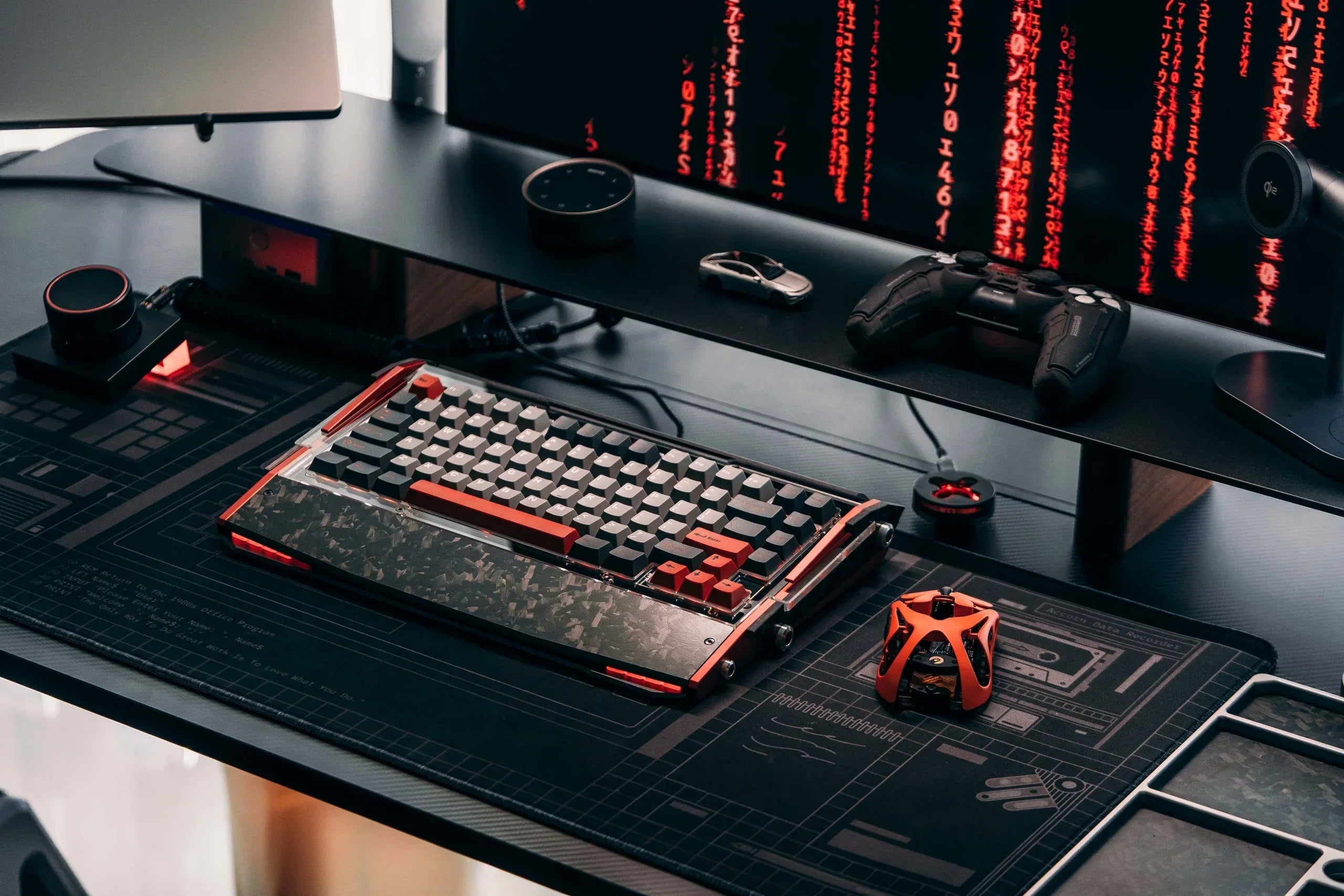
The main types of keyboards can be grouped by switch technology, size, connection, and purpose. By switch technology, the common types are mechanical, membrane, scissor-switch, optical, and magnetic keyboards. Size options include full-size, 96% or 98%, TKL, 75%, 65%, and 60%. A single keyboard can belong to several groups at once.
How Are the Different Types of Keyboards Classified?
“Keyboard type” does not refer to only one feature. A keyboard may be described by how its keys register input, how many keys it has, how it connects, or what it is designed to do. Understanding these four categories makes product descriptions much easier to compare.
-
Switch technology determines key feel, sound, actuation, and repair options.
-
Size and physical layout determine which keys are included and how much desk space the keyboard uses.
-
Connection type determines whether the keyboard uses a cable, receiver, or Bluetooth.
-
Purpose describes features developed for gaming, office work, travel, accessibility, or comfort.
A thoughtfully designed gaming keyboard may combine fast switches, reliable multi-key input, a compact layout, and flexible connections. Each feature answers a different need, so it is better to compare them separately before choosing a model.
What Types of Keyboards Use Different Switch Technologies?
Switch technology is the most important technical classification because it controls how a press becomes an electrical input. It also has a major effect on sound and feel.
Mechanical Keyboards
A mechanical keyboard places an individual switch beneath every key. Traditional mechanical switches use a stem, spring, housing, and metal contacts. Linear switches feel smooth, tactile switches provide a bump, and clicky switches add an audible click.
Mechanical keyboards are popular for consistent feedback, durability, and customization. Hot-swappable models allow switches to be changed without soldering. Common drawbacks are higher cost, greater height, and more noise.

Membrane Keyboards
A membrane keyboard uses rubber domes and flexible circuit layers. Pressing a key collapses the dome and brings conductive layers together. This simple construction keeps prices and noise low, which is why membrane models remain common in schools, offices, and basic desktop sets.
The keypress usually feels softer and less defined than a mechanical switch. The shared membrane is difficult to repair, but this keyboard type still handles everyday typing and casual gaming well.
Scissor-Switch Keyboards
Scissor-switch keyboards use a small crossing mechanism to stabilize each keycap, usually above a membrane or dome contact. They have short travel, a low profile, and quiet operation. Most laptop keyboards use a version of this design.
They suit portable work and people who prefer a laptop-like feel, though they are harder to repair and offer fewer choices in key feel.
Optical Keyboards
Optical keyboards use light to detect a keypress, reducing contact wear and supporting fast, consistent input. Their moving parts can still feel similar to mechanical switches.
Optical models often target gaming, but switch compatibility may be limited to one manufacturer’s system. The label alone does not guarantee low latency.
Magnetic Keyboards
Magnetic keyboards use Hall effect sensors to measure the position of a magnet inside each switch. Many models allow users to adjust the actuation point and use Rapid Trigger, which resets a key according to its movement instead of one fixed reset position.
These features help with fast directional inputs in competitive games. In practice, performance also depends on RT stability, scan rate, polling rate, and how well the sensors maintain accuracy during long sessions. Magnetic keyboards cost more, and their advanced settings offer less value for basic office use.

How Do the Five Main Types of Keyboards Compare?
|
Switch-based keyboard type |
Main strength |
Main trade-off |
Common use |
|
Mechanical |
Defined feel and customization |
Higher cost and possible noise |
Typing, gaming, custom setups |
|
Membrane |
Quiet and affordable |
Less defined feel and limited repairability |
Office, school, basic use |
|
Scissor-switch |
Slim, stable, and portable |
Limited repair and customization |
Laptops and mobile work |
|
Optical |
Fast sensing and low contact wear |
Ecosystem compatibility can be limited |
Gaming and high-use setups |
|
Magnetic |
Adjustable actuation and Rapid Trigger |
Higher cost and added setup |
Competitive gaming |
This comparison summarizes the five keyboard types defined by switch technology. Size, connection, and purpose are separate classifications covered in the following sections.
What Types of Keyboards Are Available by Size?
Keyboard size describes the physical key arrangement, not the switch technology. Exploring custom keyboards across several layouts and switch technologies makes it easier to decide which combination fits your routine.
Full-Size and 96% Keyboards
A full-size keyboard includes the alphanumeric section, function row, navigation cluster, arrows, and number pad. It suits data entry, spreadsheets, and users who want every major key visible.
A 96% or 98% keyboard keeps nearly all those functions in a narrower body, although the tighter arrangement may require adjustment.
TKL and 75% Keyboards
A tenkeyless, or TKL, keyboard removes the number pad while keeping the function row, arrows, and most navigation keys.
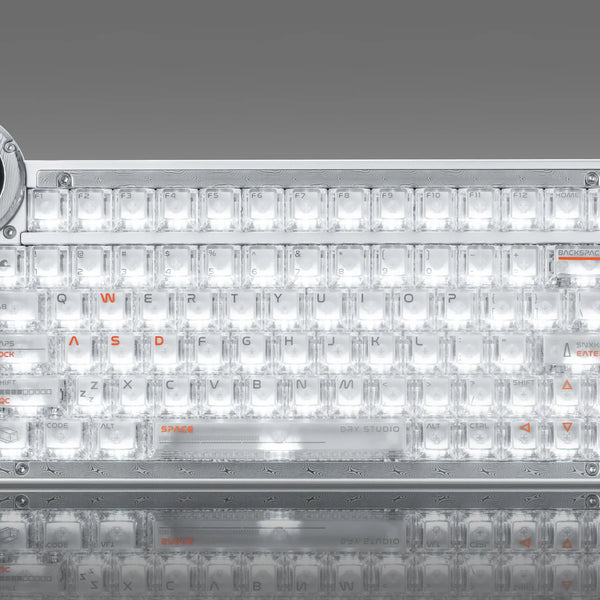
A 75% keyboard compresses those keys while retaining the function row and arrows. The Dry Studio Battleye 75 HE R2 is designed for players who want 75% functionality in a footprint close to a 60% keyboard. Its Hall Effect switches support 0.001 mm Rapid Trigger accuracy, while an 8K polling rate and 0.1 ms latency help register fast directional inputs. A 1.7-inch touchscreen shows profiles and actuation settings, and the wired USB-C connection provides consistent performance for competitive play.
65% and 60% Keyboards
A 65% keyboard keeps arrow and some navigation keys but removes the function row and number pad.
A 60% keyboard moves arrows, the function row, and most navigation keys to key combinations. It maximizes mouse room, but frequent editing may be easier on a larger layout.
What Types of Keyboards Use Wired or Wireless Connections?
Wired keyboards connect through USB and do not need battery charging. They offer simple setup and stable communication, making them practical for fixed desks and systems where reliability is the main concern.
Wireless keyboards use Bluetooth, a 2.4GHz receiver, or both. Bluetooth supports many mobile devices without using a USB port, while 2.4GHz usually offers lower latency. Check battery life before buying.
Tri-mode keyboards combine all three connections and work well across a desktop, laptop, and mobile device. Choose based on compatibility, mobility, latency, and charging needs.
What Types of Keyboards Are Designed for Specific Uses?
Purpose-based labels describe a feature set rather than a unique internal technology. A gaming keyboard may use mechanical, optical, magnetic, or membrane switches.
Gaming Keyboards
Gaming keyboards prioritize low latency, multi-key rollover, remapping, and macros. Compact sizes create more room for mouse movement, while full-size models may add macro keys. Compare actual latency and firmware, not appearance alone.

Ergonomic Keyboards
Ergonomic keyboards use split, curved, angled, or tented designs to support a more neutral hand position. They may help during long typing sessions, but the shape takes time to learn.
Low-Profile and Portable Keyboards
Low-profile keyboards reduce height and key travel using scissor or specialized mechanical switches. Portable models also emphasize low weight, compact size, and long battery life.
Programmable and Accessibility Keyboards
Programmable keyboards support remapping, macros, and custom layers. Accessibility models may use large legends, high-contrast keys, simplified layouts, or alternative input methods.
How Should You Choose Among the Types of Keyboards?
Start with the work you perform most often, then choose features in a logical order:
1. Choose a size based on the keys you genuinely use and the available desk space.
2. Choose switch technology based on preferred feel, sound, performance, and repairability.
3. Choose wired, wireless, or tri-mode connectivity for your devices and mobility needs.
4. Check comfort, software, key remapping, rollover, battery life, and total price.
Whenever possible, test a keyboard during normal use. Comfort depends on key weight, travel, height, and layout familiarity.
If magnetic switches are on your shortlist, look beyond adjustable actuation alone. Real magnetic gaming keyboard performance also depends on RT stability, temperature control, scan rate, polling rate, and latency during extended use.
FAQs
What Are the Five Main Types of Keyboards?
The five main switch-based types are mechanical, membrane, scissor-switch, optical, and magnetic keyboards. They can also be classified by size, connection, and intended use, so the categories often overlap.
Which Type of Keyboard Is Best for Everyday Use?
A membrane or scissor-switch keyboard suits quiet, simple daily use. Mechanical keyboards offer clearer feedback and easier customization. The best option depends on comfort, noise, desk space, budget, and how much you type.
Which Type of Keyboard Is Best for Gaming?
Mechanical and magnetic keyboards are common gaming choices. Mechanical switches provide consistent feedback, while magnetic switches can add adjustable actuation and Rapid Trigger. Latency, rollover, layout, and firmware also matter.
Is a Compact Keyboard Harder to Use?
It can feel unfamiliar because some keys move to function layers. A 75% or 65% layout keeps more dedicated controls than a 60% model. Choose the smallest layout that still provides convenient access to the keys you use regularly.
Do Laptop Keyboards Use Membrane Switches?
Many laptops use scissor mechanisms over rubber-dome or membrane contacts. The scissor structure stabilizes the keycap and keeps travel short, while the underlying dome or membrane registers the input.
Final Thoughts
The five main keyboard types are mechanical, membrane, scissor-switch, optical, and magnetic. Keyboards are also grouped by size, connection, and purpose.
Choose by starting with the keys and desk space you need, then compare switch feel, sound, connectivity, comfort, and price. The most advanced type is not automatically the best; the right keyboard is the one whose combined features fit your daily work and play.
WRITTEN BY
Angry Miao
Gaming Mouse Specialist • Angry Miao Editorial Team
-
-
-
-
More articlesShare:
Best Gaming Keyboard Picks for Every Player in 2026
Why Is My Computer Keyboard Not Working? 10 Ways to Fix It