
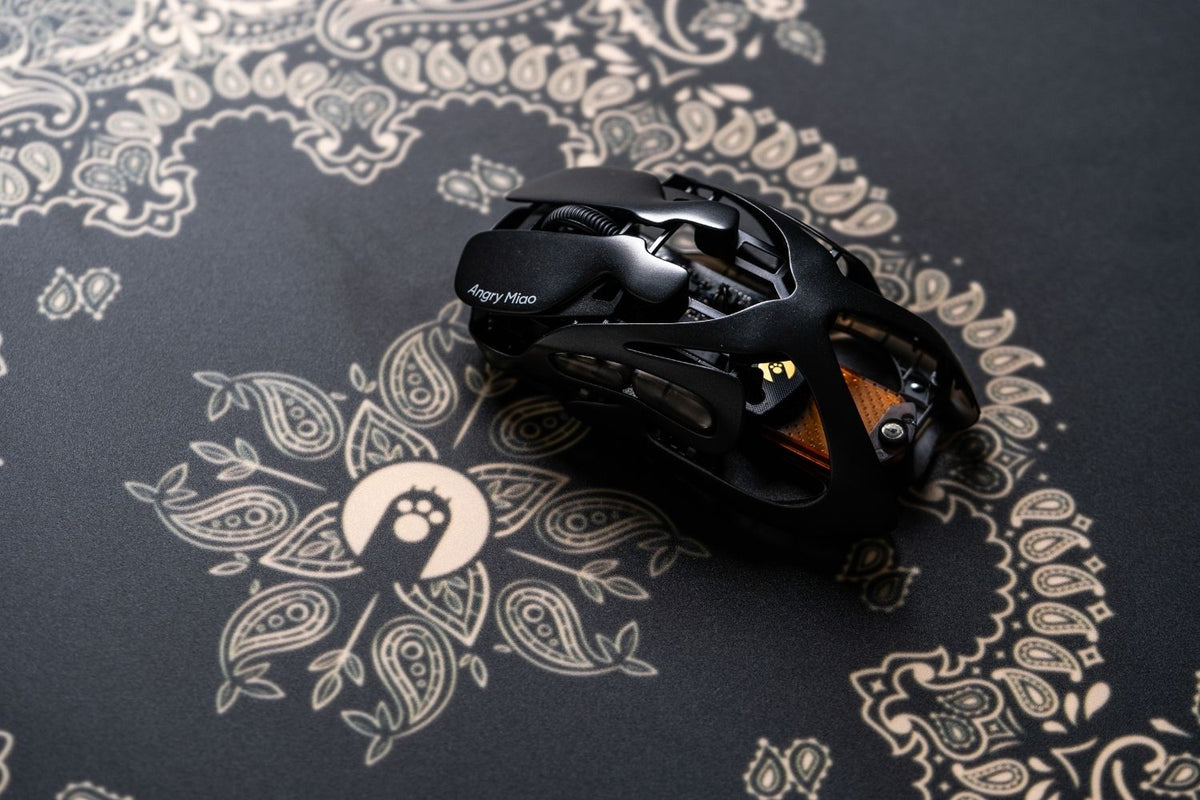
A good budget gaming mouse should balance price, shape, weight, and performance rather than chase the highest specs. The Logitech G305 is the safest low-cost wireless choice for most players, while the AM Infinity Mouse delivers stronger high-end hardware for shoppers who can stretch to $119.99. Between them, the Razer Viper V3 HyperSpeed and SteelSeries Aerox 3 Wireless create clearer midrange and premium-value steps.
Which Budget Gaming Mouse Features Matter Most?
Shape and Grip
Shape is the first decision because a technically faster mouse still feels wrong if its hump, width, or length fights your grip. Compact symmetrical shapes often suit fingertip and claw grip, while broader right-handed shells give palm users more support. Check dimensions and return terms whenever possible, especially if your hands are very small or large.
Weight and Connection
A mouse around 50 to 70g is easier to move repeatedly in FPS games, while heavier ergonomic and MMO models trade speed for support or more controls. Modern wireless gaming mouse can feel responsive at 1,000Hz, but low-cost wireless models may use replaceable batteries that increase operating weight. Wired models avoid charging and receiver issues, although cable drag remains a trade-off.
Sensor, Polling Rate, and Buttons
Do not rank mice by maximum DPI alone. Consistent tracking, stable 1,000Hz polling, low click delay, usable software, and dependable switches matter more for most players. Six buttons are enough for shooters and general play; MMO users may benefit from a side grid, while extra controls add weight and make the shell larger.
What Are the Best Budget Gaming Mice at a Glance?
|
Mouse |
Best for |
Connection |
Weight |
Price |
|
Logitech G305 LIGHTSPEED |
Overall wireless value |
2.4GHz |
99g |
$59.99 regular |
|
AM Infinity Mouse |
Premium performance value |
2.4GHz / Bluetooth / wired |
49g wireless |
$119.99 |
|
Razer Cobra |
Lightweight wired gaming |
Wired |
58g |
$39.99 |
|
Razer Basilisk V3 X HyperSpeed |
Ergonomic wireless controls |
2.4GHz / Bluetooth |
110g |
$69.99 |
|
HyperX Pulsefire Haste 2 Core |
Light dual-wireless use |
2.4GHz / Bluetooth |
70g with battery |
$49.99 |
|
SteelSeries Aerox 3 Wireless |
Light premium-value wireless |
2.4GHz / Bluetooth |
68g |
$119.99 |
|
Razer Viper V3 HyperSpeed |
Wireless FPS value |
2.4GHz |
82g |
$69.99 |
Which Budget Gaming Mice Are Worth Buying?
AM Infinity Mouse
 The G305 remains the safest low-cost wireless recommendation because its HERO sensor, 1ms LIGHTSPEED connection, six programmable buttons, and advertised 250-hour battery life cover the essentials. It is compact and widely supported, but its 99g listed weight is much heavier than newer ultralight options, and the AA battery cannot be recharged through the mouse.
AM Infinity Mouse
 The AM Infinity mouse is priced at $119.99, offering excellent value for money, but its 49g magnesium-alloy body, PAW3950 sensor, up to 30,000 DPI, and dual 8K polling compete with more expensive esports mice. Its hot-swappable battery reconnects in about 1.2 seconds, while the spare battery can charge on the receiver, reducing the usual interruption of wireless charging.
Razer Cobra
 The Razer Cobra is a sensible $39.99 choice for players who want a compact 58g shell without managing batteries. Its 8,500 DPI sensor, 1,000Hz polling, six programmable buttons, optical switches, and flexible Speedflex cable cover competitive basics. The right-handed symmetrical shape favors claw and fingertip grip, but it may feel too narrow for larger palm users.
Razer Basilisk V3 X HyperSpeed

The Basilisk V3 X HyperSpeed is the choice for right-handed players who value thumb support and extra controls more than minimum weight. For $69.99, it offers 2.4GHz and Bluetooth connections, seven programmable buttons, an 18,000 DPI sensor, and up to 285 hours of advertised HyperSpeed battery life. At roughly 110g, it is better for comfort and mixed games than fast FPS flicks.
HyperX Pulsefire Haste 2 Core Wireless

The $49.99 Pulsefire Haste 2 Core Wireless sits at the lower edge of this tier and weighs about 70g with its AAA battery. It supports 2.4GHz and Bluetooth, with a 12,000 DPI sensor, 1,000Hz polling, six buttons, and an advertised 100-hour 2.4GHz battery life. Use the dongle for games where response matters because Bluetooth runs at a lower polling rate.
SteelSeries Aerox 3 Wireless

The Aerox 3 Wireless costs $119.99 and weighs 68g, providing a lighter alternative for players who do not need the Infinity Mouse's metal construction or swappable power system. It combines 2.4GHz and Bluetooth, an 18,000 CPI TrueMove Air sensor, six buttons, IP54-rated protection, and up to 200 hours of advertised battery life. Its perforated shell is light, but the open look is not for everyone.
Razer Viper V3 HyperSpeed

At $69.99, the Viper V3 HyperSpeed brings a Focus Pro 30K optical sensor and up to 280 hours of advertised battery life to the mid-price tier. Its 82g right-handed symmetrical body is designed for claw and fingertip grip. The optional HyperPolling dongle can raise polling to 8,000Hz, but it is sold separately and adds to the total cost.
How Should You Choose the Best Budget Gaming Mouse?
Start with hand fit and grip, then decide whether low weight, ergonomic support, extra buttons, or wireless freedom matters most. A $35 wired mouse can be the better purchase if it fits well, while paying more makes sense when the upgrade solves a real problem such as cable drag, battery interruptions, or excess weight.
For a wider comparison beyond price-limited models, a best gaming mouse shortlist helps show which premium features are genuinely useful. Do not pay extra for headline DPI or polling figures unless the shape, connection, and overall design already fit your needs.
FAQs
What gaming mouse should I get in 2026?
Choose the Logitech G305 for affordable wireless play, the Razer Cobra for a light wired setup, or Angry Miao's AM Infinity Mouse when you want a 49g metal body, dual 8K polling, and a hot-swappable battery at a higher value-focused price.
Which is the best gaming mouse under budget?
The Logitech G305 is the safest low-cost wireless choice, while the Razer Cobra and Model O Eternal are stronger lightweight wired options. Pick by hand fit and connection first, because a cheaper mouse that fits well usually performs better for you.
Is 4000Hz better than 1000Hz?
A 4,000Hz mouse reports its position more often and can reduce update intervals, but the difference is subtle and depends on frame rate, monitor refresh rate, and CPU performance. A stable 1,000Hz connection is enough for most players and uses less battery.
What is the best mid-priced gaming mouse?
The Razer Basilisk V3 X HyperSpeed is a strong mid-priced option for ergonomic comfort and extra controls. If performance matters more than keeping the price below $100, the Angry Miao AM Infinity Mouse adds lower weight, dual 8K polling, and swappable power.
Which mouse is best for FPS?
For budget FPS play, the 58g Razer Cobra and 55g Model O Eternal provide light wired control. Players willing to spend more can consider the 49g AM Infinity Mouse for a PAW3950 sensor and dual 8K polling, provided its shape fits their grip.
Conclusion
The best value changes by tier: choose the G305 or Cobra around $40, the Viper V3 HyperSpeed near $70, or the AM Infinity Mouse up to $120. Compare shape and grip first, then decide which performance upgrades justify the higher price.
WRITTEN BY
Angry Miao
Gaming Mouse Specialist • Angry Miao Editorial Team
-
-
-
-
More articlesShare:
8 Best RGB Keyboards in 2026 for Every Gamer
How to Connect a Keyboard and Mouse to PS5: 3 Easy Ways