

Mouse weight is one of the most noticeable differences when switching between gaming mice. A heavier mouse offers stability and resistance; a lighter one allows faster movement with less fatigue. Which suits you depends on how you play. This guide covers what the weight categories mean and how to match weight.
What Is Considered a Lightweight or Heavy Gaming Mouse?
Lightweight (under 70 g): Built for maximum agility, often using hollow shells, perforated designs, or lightweight materials like magnesium alloy. Most competitive FPS players operate in this range. A quality gaming mouse here prioritises low inertia above everything else.
Mid-weight (70–100 g): The most common category. Balances speed and stability, suits a wide range of grip styles and genres, and is the default for most mid-range gaming mice.
Heavyweight (over 100 g): Found in larger shells, mice with extra buttons, or adjustable weight systems. The added mass provides resistance during movement, which some players prefer for precision work in slower-paced games.
|
Category |
Weight Range |
Best For |
|
Lightweight |
Under 70 g |
FPS, fast flicks, fingertip/claw grip |
|
Mid-weight |
70–100 g |
All-round gaming, mixed use |
|
Heavyweight |
Over 100 g |
Strategy, RTS, precision tasks |
Lightweight Gaming Mouse: Pros and Cons

Pros
-
Faster movement: Less inertia means direction changes happen immediately, with no lag between intention and motion.
- Lower fatigue: Less effort required per movement reduces wrist and finger strain over long sessions.
- Ideal for flick shots: The ability to move quickly and stop cleanly is critical in FPS — lightweight mice excel here.
-
Better for wide sweeps: Palm grip players using large arm movements at low sensitivity benefit most from a lighter shell.
Cons
- Less stability: Without the weight to anchor it, a lightweight mouse can feel skittish during slow, precise movements.
- Thinner build: Many lightweight designs use hollow or perforated shells that may be less durable under heavy use.
-
Shorter battery life: Lighter wireless mice often carry smaller batteries to save weight, requiring more frequent charging.
Heavy Gaming Mouse: Pros and Cons
Pros
- More stability: The added mass dampens micro-movements and provides a planted feel, useful for slow tracking shots or strategy game precision.
- Better palm support: Larger, heavier shells tend to fill the hand more fully, which suits palm grip players who want full contact during long sessions.
-
Helps build muscle memory: The resistance of a heavier mouse can make movements more deliberate and repeatable over time.
Cons
- More fatigue over time: Moving a heavier mouse repeatedly across large distances adds up. In extended sessions, the extra grams translate directly into wrist strain.
- Slower direction changes: Higher inertia makes fast flicks and rapid directional changes harder to execute cleanly.
-
Less suitable for low-sensitivity setups: Players who make wide arm sweeps at low DPI will tire faster with a heavier mouse.
What Affects the Weight of a Lightweight Mouse?
Several design factors determine whether a mouse comes in under 70 g:
Shell material. Plastic remains the most common, but high-end lightweight mice use magnesium alloy or carbon fibre — materials that maintain structural rigidity at significantly lower mass than standard ABS plastic.
Shell structure. Solid shells are heavier; hollow or honeycomb-perforated designs remove material from non-structural areas to reduce weight without sacrificing the overall frame integrity.
Internal components. Sensor module, PCB, and switches contribute a fixed baseline. Mice with more programmable buttons or onboard memory add circuitry that increases weight.
Battery (wireless mice). Battery size is the single largest variable in wireless mouse weight. A larger battery extends life but adds grams directly. Ultra-light wireless mice manage this by using smaller cells and compensating with efficient power management — or, in some cases, hot-swappable batteries that let you carry a spare rather than a larger built-in cell.
Connection type. Wired mice skip the battery entirely, which is why many of the lightest mice on the market are wired. Wireless models that match wired weights typically use the design approaches above in combination.

How Mouse Weight Affects Your Gaming
Speed and Flick Shots
In FPS games, a flick shot requires moving the cursor across the screen and landing on a target in under a second. A lighter mouse starts and stops that motion with less physical effort. A heavier mouse carries more momentum, making it harder to stop exactly where you intend. For players running low sensitivity with wide arm sweeps, this difference is directly noticeable.
Fatigue Over Long Sessions
A 30 g difference between two mice is imperceptible on a single movement but noticeable after several hours. Lighter mice consistently produce less wrist and finger fatigue over time. For competitive players who practice daily or for anyone gaming 3+ hours regularly, a wireless gaming mouse under 70 g is worth prioritising for ergonomic reasons alone.
Aim Control and Stability
A heavier mouse can improve consistency in slow tracking scenarios. The added mass smooths out micro-tremors and makes it harder to accidentally nudge the cursor off target. For RTS, MMO, or any game where slow, deliberate cursor movement matters more than fast flicks, that stability is a genuine advantage.
Lightweight vs Heavy: At a Glance
|
Lightweight (under 70 g) |
Mid-weight (70–100 g) |
Heavyweight (over 100 g) |
|
|
Direction change speed |
Fast |
Moderate |
Slow |
|
Flick shot performance |
Excellent |
Good |
Fair |
|
Tracking stability |
Lower |
Balanced |
Higher |
|
Long-session fatigue |
Low |
Moderate |
High |
|
Palm support |
Less |
Moderate |
More |
|
Typical use case |
Competitive FPS |
All-round |
Strategy, precision |
How to Choose the Right Mouse Weight
Which Weight Suits Your Grip Style?
Palm grip players rest their full hand on the mouse and drive movement from the arm and shoulder. Mid-weight suits this grip — the palm contact provides natural stabilisation, but anything over 90 g starts adding noticeable fatigue during long sessions where the whole arm moves continuously.
Claw grip players arch their fingers and anchor with the palm heel. This grip benefits from mid-weight mice — light enough for fast clicks and wrist movements, substantial enough to feel anchored during larger sweeps.
Fingertip grip players control the mouse entirely with the fingertips and no palm contact. This grip is the most sensitive to weight. Heavy mice directly undermine the control advantage fingertip provides — ideal weight for fingertip users is under 60 g, and lower is almost always better.

By Game Genre
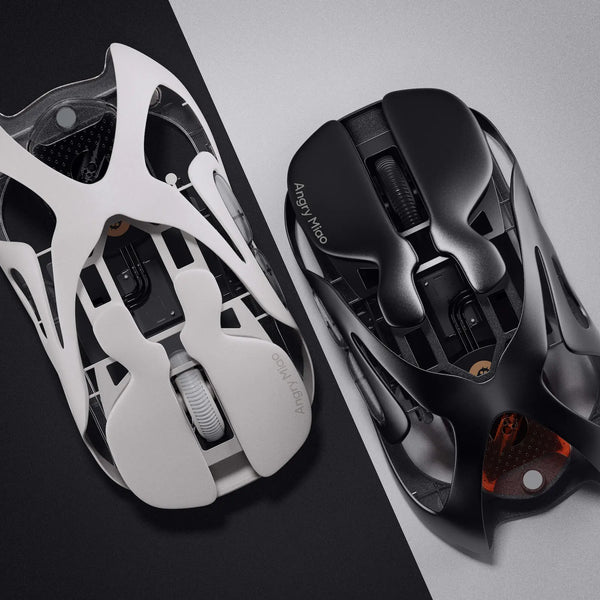
FPS and Battle Royale: Under 70 g. Speed and flick shot performance are the primary requirements. The lightweight gaming mouse AM Infinity at 47 g with a PAW3950 sensor sits at the competitive end of this range — light enough for fast play, precise enough for any engagement distance.
MMO and MOBA: 70–90 g. Rapid flicking is less central; stability and button accessibility over long sessions matter more.
RTS and Strategy: 80–110 g. Slow, deliberate cursor movement benefits from the stabilising effect of more mass.
Casual and mixed use: Mid-weight is the safe default. It doesn't compromise in any direction and works across genres without adjustment.
For specific model recommendations across weight classes, the best lightweight gaming mouse 2026 guide covers the top options with full spec comparisons.
Conclusion
Lightweight mice win on speed, agility, and fatigue reduction — the right call for competitive FPS and anyone gaming for extended daily sessions. Heavier mice offer stability for slower, precision-heavy play. Match your weight to your grip style and game genre before anything else. Angry Miao builds at the lightweight end of the spectrum, where every gram is a design decision.
FAQ
What is a good weight for a gaming mouse?
Under 70 g for competitive FPS; 70–90 g for all-round gaming. Most players don't need more than 90 g for any genre.
Does a lighter mouse improve aim?
For fast flick-heavy play, yes. For slow tracking, a slightly heavier mouse can improve consistency by dampening micro-movements.
Is a heavy mouse bad for gaming?
Not for strategy and precision genres. For fast-paced FPS, the extra weight slows flick shots and adds fatigue over long sessions.
Does mouse weight affect wrist health?
Yes. Heavier mice require more force per movement, which compounds across hours of play. Players with wrist sensitivity benefit most from lighter options.
What weight do pro FPS players use?
Most competitive FPS professionals use mice in the 40–70 g range. The shift toward ultra-light has been consistent across the professional scene for several years.
WRITTEN BY
Angry Miao
Gaming Mouse Specialist • Angry Miao Editorial Team
-
-
-
-
More articlesShare:
Are Keyboard Covers Worth It? Buying Tips
Angry Miao SilkGlass – Redefining Glass Mousepad for Gamers