
Mechanical keyboard switches sit under every keycap and determine how each keypress feels, sounds, and registers. Three main types cover most use cases — linear, tactile, and clicky — each with a distinct character. Getting the right one makes a real difference to typing comfort and gaming performance. This guide covers how switches work, what each type does, and how to match one to your setup.
What Are Mechanical Keyboard Switches?
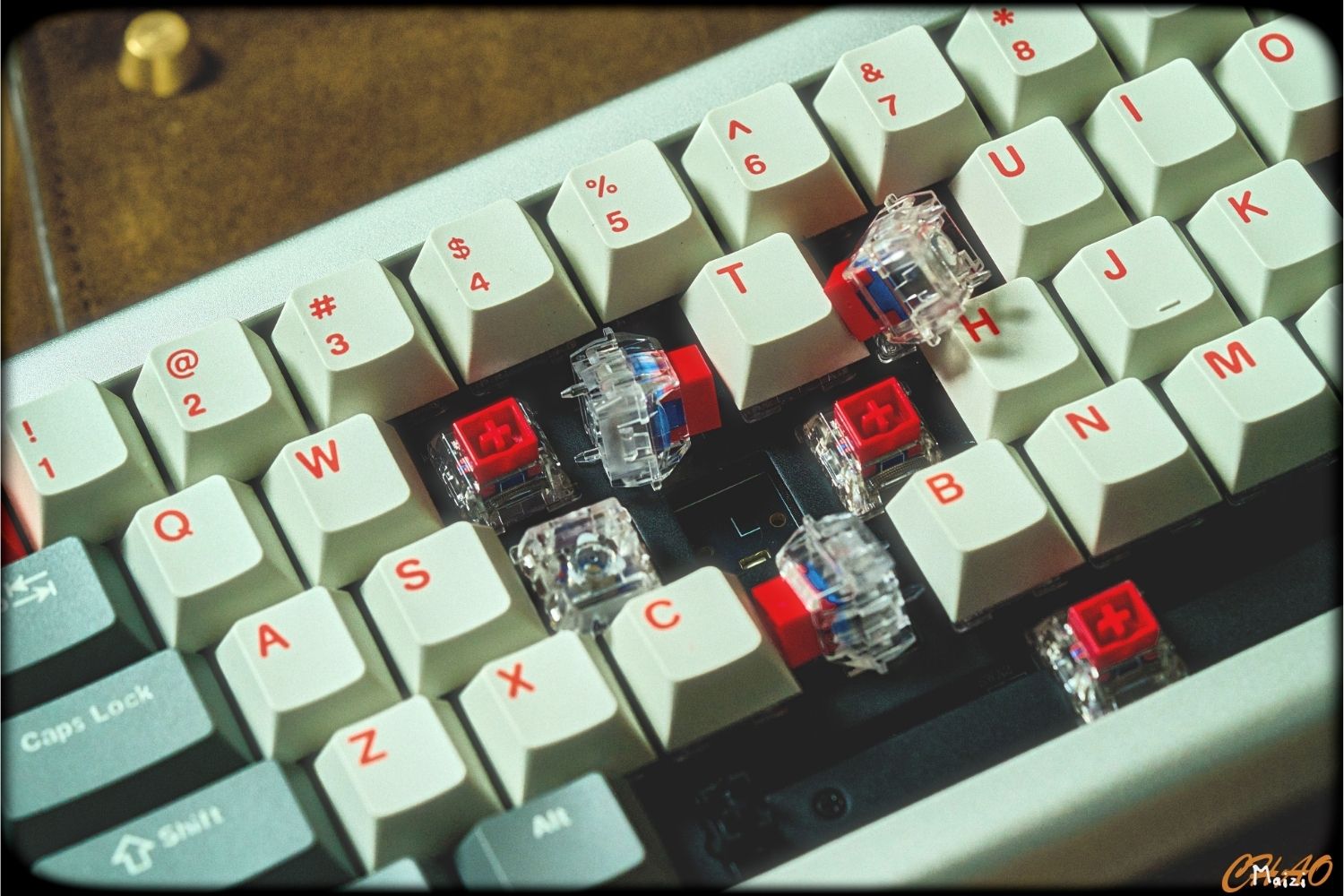
A mechanical keyboard switch is the individual mechanism beneath each keycap. Every switch consists of four core components:
Upper and lower housing — the outer shell that encloses the mechanism and mounts to the keyboard PCB. The housing material and tolerances affect how smooth or scratchy the switch feels during travel.
Stem — the moving part attached to the keycap. The shape of the stem determines the switch type: a straight stem produces a linear stroke; a stem with a leg or bump creates tactile or clicky feedback at the actuation point.
Spring — sits beneath the stem and provides resistance throughout the travel. Heavier springs require more force to compress; lighter springs actuate more easily. Spring weight is the primary factor behind actuation force.
Metal contacts — two conductive leaves inside the housing that complete a circuit when the stem reaches the actuation point, sending the keypress signal to the computer. In Hall Effect switches, magnets and sensors replace these contacts entirely.

The combination of these components — how the stem is shaped, how heavy the spring is, and where the contacts sit — determines everything about how the switch feels. Every custom keyboard spec sheet lists two parameters that summarise this:
Actuation Force
Actuation force is how much pressure is needed to register a keypress, measured in grams. Lower values (35–45g) mean lighter, faster presses with less finger effort — better for rapid gaming inputs and long typing sessions. Higher values (55–65g) feel more deliberate and resist accidental keypresses, which suits users with a heavy resting hand or those doing precise data entry.
Travel Distance
Travel distance breaks down into two measurements. Pre-travel (actuation distance) is how far the key moves before the press registers — typically 1.2–2.0mm depending on the switch. Total travel is the full distance from resting position to fully bottomed out, usually 4.0mm.
A shorter pre-travel register keypresses faster and is preferred for competitive gaming. A longer pre-travel gives more physical room to feel the tactile or clicky event before the key fires, which some typists find easier to control. Most players never bottom out deliberately — the key registers well before the end of travel, and stopping at actuation rather than bottoming out reduces both fatigue and noise.
The Three Main Types of Mechanical Keyboard Switches
Linear Switches
Linear switches travel straight down with no bump, no click, and no resistance other than the spring. The stroke is smooth and consistent from start to finish — typically 45g actuation at 2.0mm.
Because there's no tactile event to push through, linear switches allow fast, repeatable keypresses, making them the standard for competitive gaming. They're also the quietest of the three, suited to shared environments and streaming setups. The tradeoff is the lack of feedback — without a bump to confirm actuation, it's easier to accidentally press keys or bottom out unnecessarily.
Best for: Competitive gaming, fast typists, shared or quiet spaces.

Tactile Switches
Tactile switches produce a noticeable bump at the actuation point without an audible click. You feel the key register without pressing all the way down — typically 45–55g actuation. The bump makes it easier to type accurately without visual confirmation, reduces bottoming out, and lowers fatigue over long sessions.
Tactile switches are the most versatile of the three — capable across gaming, typing, and coding without being the absolute best at any single one.
Best for: Typing, coding, mixed gaming and productivity use.
Clicky Switches
Clicky switches produce both a tactile bump and an audible click at actuation — typically 50–60g at 2.2mm. Many typists find the rhythmic feedback the most satisfying option for long sessions. The click mechanism also introduces a small reset delay that makes rapid repeated keypresses slightly less efficient than linear switches.
The noise is the biggest practical constraint. Clicky switches are audible across a room and disruptive on voice chat. In any shared environment, they're a difficult choice regardless of how they feel.
Best for: Solo typing environments, writers, users who want maximum auditory feedback.
Linear vs Tactile vs Clicky at a Glance
|
Linear |
Tactile |
Clicky |
|
|
Tactile bump |
No |
Yes |
Yes |
|
Audible click |
No |
No |
Yes |
|
Typical actuation force |
45g |
45–55g |
50–60g |
|
Noise level |
Quiet |
Moderate |
Loud |
|
Gaming suitability |
Excellent |
Good |
Fair |
|
Typing suitability |
Good |
Excellent |
Excellent |
|
Best environment |
Any |
Any |
Private only |
Other Switch Types Worth Knowing
Hall Effect Switches
Hall Effect switches replace the spring-and-contact mechanism with magnets and sensors. No physical contact is required to register a keypress, which removes the most common points of mechanical wear and significantly extends durability.
The competitive advantage is adjustable actuation — the actuation point can be set anywhere in the travel range via software, from 0.1mm for instant response to 4.0mm. This also enables Rapid Trigger, which resets the key the moment it starts moving upward rather than at a fixed reset point. The hall effect keyboard category has grown quickly among competitive players for exactly this reason.

Optical Switches
Optical switches use an infrared light beam instead of metal contacts to register keypresses. Fast, durable, and debounce-free — but not compatible with standard MX keyboards and less widely available than MX-style switches.
How to Choose the Right Switch
By Use Case
Competitive gaming: Linear, or Hall Effect with Rapid Trigger for adjustable actuation.
Typing and writing: Tactile or clicky, depending on noise tolerance. Either improves accuracy over linear for long sessions.
Coding: Tactile — the bump confirms keypresses without the noise of clicky switches.
Mixed use: Tactile is the most versatile choice across gaming and productivity.
Shared spaces: Linear or silent tactile. The range of keyboard switches available includes silent variants for both types that reduce noise without changing actuation feel.
By Environment
Private setup: Any type is viable — clicky switches are practical here in a way they aren't elsewhere.
Shared office or open plan: Linear or silent tactile only. Standard clicky is disruptive in close quarters.
Streaming or voice chat: Linear — quieter operation doesn't bleed into the microphone.
Switch Compatibility: What to Check Before Buying
Hot-swap support. Switches can only be swapped on keyboards with hot-swap sockets. Without it, changing switches requires soldering. Check the keyboard spec sheet before assuming switches are replaceable.
Switch technology. MX-style, optical, and Hall Effect switches are not interchangeable. Each requires a keyboard designed for that technology. Most keyboards use MX-style; optical and Hall Effect are clearly labelled.
Pin count. MX-style switches come in 3-pin and 5-pin variants. 5-pin switches can be modified to fit 3-pin keyboards by clipping the two extra plastic pins. 3-pin switches fit both.
Keyboard Size and layout dictate how many switches you need to buy. Count your keys and always buy a few extra as backups. Also, check the height: standard MX switches will not fit a low-profile keyboard, and vice versa.
Conclusion
Linear switches are fast and quiet — the standard for gaming and shared environments. Tactile switches offer feedback without noise — the most versatile choice for mixed use. Clicky switches are the most satisfying for typing, but are restricted to private setups. Hall Effect raises the ceiling further for competitive gaming. Match the switch to how you actually use the keyboard, and the difference is immediate. Angry Miao builds across linear, tactile, and Hall Effect options — including magnetic switch keyboards with adjustable actuation for players who want full control over how their keys respond.
FAQ
What switch type is best for gaming?
Linear is the standard — smooth, fast, and quiet. Hall Effect with Rapid Trigger is increasingly popular for competitive FPS players who want adjustable actuation.
What switch is best for typing?
Tactile or clicky, depending on your environment. Both improve accuracy over linear for long typing sessions.
Are clicky switches bad for gaming?
For casual play, no. For rapid competitive inputs, the reset delay makes linear switches perform better.
What is the difference between 3-pin and 5-pin switches?
The two extra pins on a 5-pin switch are plastic stabilisers. Clip them to fit a 3-pin keyboard. 3-pin switches fit both keyboard types without modification..
What is Rapid Trigger?
A Hall Effect feature that resets the key the moment it starts moving upward, rather than at a fixed reset point — useful for faster repeated inputs in competitive FPS.
WRITTEN BY
Angry Miao
Gaming Mouse Specialist • Angry Miao Editorial Team
-
-
-
-
More articlesShare:
AM ice ring 63 RT: Next-Level Magnetic Gaming Keyboard
Magnetic vs. Mechanical Keyboards: Which Should You Choose in 2026?