

The best keyboard for programming should keep long sessions comfortable and adapt shortcuts to your workflow. For most developers in 2026, the Keychron Q1 Max offers the strongest balance. Data-heavy work favors the ATM 98, while an HHKB, ZSA Voyager, or AM AFA R2 suits specialized workflows.
This guide compares eight choices, focusing on layout, programmability, switch feel, noise, and connectivity.
What Makes the Best Keyboards for Programming Different?
A programming keyboard does not need a special “coding” switch. What matters is how comfortably it supports typing symbols, navigating text, running commands, and switching between an editor and terminal.
Practical Key Access
A 75% or tenkeyless layout keeps arrows, a function row, and navigation keys without occupying full-size desk space. A 60% board can be efficient once its layers become familiar, but it requires more key combinations.
Programmable Shortcuts
Remapping lets you place Escape, Control, brackets, or macros where they suit your editor. A good gaming keyboard also works for development when it combines reliable switches with software-based key assignment.
Comfort and Noise
Long sessions make front height, typing angle, switch weight, and wrist position more important than maximum speed. In a shared office, quiet scissor or silent mechanical switches are more considerate than clicky ones.
Operating-System Support
Developers who move between Windows, macOS, and Linux should check modifier placement and remapping support. Bluetooth switching is convenient, while wired or 2.4 GHz operation is more dependable.
Which Best Keyboards for Programming Stand Out in 2026?
These models cover common programming needs. Keychron’s Q series appears most consistently across developer recommendations, although no keyboard suits every user.
|
Keyboard |
Price (USD) |
Layout |
Features programmers and typists care about |
Main trade-off |
|
Keychron Q1 Max |
From $189.99 |
75% |
QMK/VIA, hot-swap, function row, tri-mode |
Heavy for travel |
|
ATM 98 |
$199 sale price |
98% |
Silent linear switches, numpad, QMK, programmable knob, tri-mode |
Heavy for travel |
|
HHKB Professional Hybrid Type-S |
About $320 |
60% |
Silent Topre switches, remapping, four-device Bluetooth |
Unusual layered layout |
|
ZSA Voyager |
About $365 |
52-key split |
Columnar keys, thumb keys, Oryx layers, hot-swap |
Steep learning curve |
|
Logitech MX Keys S |
$129.99 |
Full-size |
Quiet scissor keys, numpad, three-device switching |
Fixed typing feel |
|
NuPhy Air75 V3 |
$139.95 |
75% |
Low-profile switches, function row, portable tri-mode design |
Fewer compatible switches |
|
Glorious GMMK Pro |
From $119.99 barebones |
75% |
QMK/VIA, five-pin hot-swap, gasket mount, knob |
Wired; switches and keycaps may cost extra |
|
AM AFA R2 |
From $544 sale price |
Alice-style split |
Angled key groups, 64.5 mm separation, hot-swap, wrist rests |
Expensive; layout takes practice |
If you want to choose switches, keycaps, sound treatment, and feel, custom keyboards offer more tuning than sealed office models. That matters when one keyboard handles coding, writing, and gaming.
Which Programming Keyboards Are Best for Most Developers?
Keychron Q1 Max — Best Overall
 Starting at $189.99, the Q1 Max is the safest recommendation for most programmers because its 75% layout retains arrows and the function row. QMK/VIA enables detailed remapping, while hot-swap sockets make switch changes easy. Its aluminum construction and multi-mode connection suit a permanent desk, but the weight discourages travel.
ATM 98 — Best for Quiet Work and Number Entry
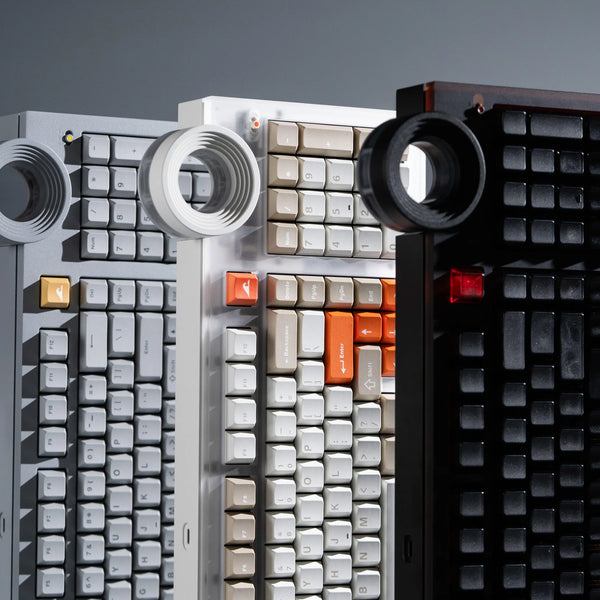
 At its current $199 sale price, the ATM 98 suits developers who enter numbers or rely on numpad shortcuts. Its 98-key layout retains a function row, while silent Bsun Light Sakura linear switches reduce office noise. QMK, a programmable Star Ring knob, tri-mode connectivity, an 18.8 mm front height, and a gasket mount support long sessions. Its 2.6 kg-plus aluminum body belongs on a fixed desk.
Which Programming Keyboards Suit Specialized Workflows?
HHKB Professional Hybrid Type-S — Best for Unix Users
 At about $320, the HHKB places Control where Caps Lock normally sits and builds its 60-key layout around layers. That can reduce movement in terminal, Emacs, and Vim workflows. Silent 45 g Topre switches suit shared rooms; stored keymaps and four-device Bluetooth add flexibility. Dedicated-arrow users face a real adjustment.
ZSA Voyager — Best Ergonomic Split
 At about $365 with shipping included, the Voyager separates its halves for a more natural hand position. Its columnar 52-key layout, low-profile hot-swap switches, thumb keys, and Oryx remapping reduce reaching. It rewards developers willing to rebuild muscle memory—not someone facing an immediate deadline.
AM AFA R2 — Best Premium Alice-Style Keyboard
 Starting at $544 for the base kit, the AM AFA R2 uses angled key groups separated by 64.5 mm to open the shoulder and elbow position. Its hot-swappable PCB, adjustable leaf-spring mount, tri-mode connectivity, and magnetic wrist rests support long sessions. It takes more adaptation than a conventional layout, while the base kit excludes switches and keycaps.

Logitech MX Keys S — Best Quiet Office Keyboard
 At $129.99, the MX Keys S uses quiet, familiar low-profile scissor keys and switches easily among devices. Its full-size layout includes a numpad and requires almost no learning period. You cannot swap switches or substantially change its feel.
NuPhy Air75 V3 — Best Portable Low-Profile Keyboard
 At $139.95, the Air75 V3 keeps a function row and arrows in a slim 75% frame. It suits developers moving between home, office, and coworking spaces. Low-profile mechanical switches offer more feedback than laptop keys, though switch choice is narrower than on MX-style boards.
Glorious GMMK Pro — Best for Hardware Customization
 Starting at $119.99 for the barebones version, the wired GMMK Pro combines a 75% layout, aluminum case, gasket mount, rotary encoder, five-pin hot-swap sockets, and QMK/VIA. It suits developers experimenting with switches and firmware, but buyers must budget for switches and keycaps.
Which Keyboard Layout Is Best for Programming?
For most developers, 75% is the easiest recommendation. It keeps the function row and arrows used by IDEs while removing the numpad. Tenkeyless is similarly approachable with a roomier navigation cluster.
A 98% or full-size keyboard suits data analysis, numerical entry, and numpad shortcuts. Its wider mouse reach can become uncomfortable on a narrow desk.
Compact and split keyboards can be efficient after customization. Layers put navigation, symbols, or macros near the home row, but demand learning time and reliable firmware. A conventional 75% or TKL is easier to share.
Which Switches and Features Matter for Programming?
Tactile, Linear, and Silent Switches
Tactile switches give an actuation bump, while lightly weighted linear switches move smoothly with less resistance. Very light models may cause accidental presses. Silent switches are the considerate choice for shared rooms.
There is no universal winner, so prioritize consistent feel and moderate force over marketing labels. Understanding the main mechanical keyboard switch types also makes it easier to choose between feedback, smoothness, sound, and fatigue rather than buying by color alone.
Keymapping and Macros
QMK/VIA, Oryx, or reliable software can improve a programming keyboard. Useful changes include moving Control or Escape, placing brackets on a layer, and creating repetitive-command macros. Never store passwords or sensitive tokens in them.
Hot-Swap and Connectivity
Hot-swap sockets are valuable if you want to change switches without soldering, but they are not required for productive coding. Likewise, wireless freedom is convenient, while a wired connection avoids charging and pairing problems. Choose features that solve an actual workflow issue instead of paying for every available option.
FAQs About the Best Keyboards for Programming
What is the best coding keyboard in 2026?
The Keychron Q1 Max is the best coding keyboard for most developers in 2026. Its 75% layout keeps arrows and function keys, while QMK/VIA remapping, hot-swap sockets, and wired, Bluetooth, and 2.4 GHz connections suit varied workflows.
What keyboard should you get in 2026?
Choose the Q1 Max for balanced everyday use, ATM 98 for quiet typing and a numpad, MX Keys S for a shared office, or AM AFA R2 and ZSA Voyager for ergonomic layouts. Match the layout, noise, and remapping support to your daily work.
Which keyboards do CS pros use?
Computer science professionals use many keyboards, including programmable Keychron models, compact HHKB boards, ergonomic ZSA keyboards, and quiet Logitech office models. There is no industry standard; editor shortcuts, comfort, portability, and OS support drive the choice.
What are the best mechanical keyboards in 2026?
For programming, leading mechanical options include Keychron Q1 Max, ATM 98, HHKB Professional Hybrid Type-S, ZSA Voyager, NuPhy Air75 V3, GMMK Pro, and AM AFA R2. Each targets a different balance of layout, typing feel, noise, and customization.
Which keyboard is best for coders?
A programmable 75% keyboard is best for most coders because it retains arrows and the function row without occupying full-size desk space. Developers who enter numbers may prefer a 98% board, while experienced layer users may work faster on a 60% or split model.
Conclusion
The Keychron Q1 Max is the best all-round programming keyboard for 2026, while the ATM 98, AM AFA R2, HHKB Type-S, and ZSA Voyager serve more specific needs. Choose by layout, comfort, noise, and remapping—not speed claims alone.
WRITTEN BY
Angry Miao
Gaming Mouse Specialist • Angry Miao Editorial Team
-
-
-
-
More articlesShare:
Optical vs Laser Mouse: Which One Should You Choose?
What Is a TKL Keyboard? Layout, Benefits, and Uses