

The best fast charging cable for iPhone 18 Pro or Pro Max is a USB-C to USB-C cable rated for at least 60W. Apple pairs its fastest wired charging tests with a 60W-capable cable and a USB PD 3.1 power adapter with AVS, so both the cable and charger matter. The five options below cover tidy desks, official Apple compatibility, low prices, fast data transfers, and compact travel use.
What Charging Cable Do the iPhone 18 Pro and Pro Max Need?
Both iPhone 18 Series use USB-C. For Apple's fastest supported wired charging setup, choose a USB-C to USB-C cable rated for 60W or more and connect it to a compatible USB PD 3.1 or newer power adapter that supports Adjustable Voltage Supply.
Data speed is a separate specification. A 480Mbps USB 2 cable is sufficient for charging, backups, and occasional file transfers. If you regularly move ProRes video or large photo libraries, a 10Gbps cable is more useful. Cable length, connector size, flexibility, and strain relief also affect how comfortable the cable is to use every day.
What Are the Best Fast Charging Cables for iPhone 18 Pro?
These five cables all provide enough rated power for iPhone 18 Pro and Pro Max fast charging.
|
Cable |
Price |
Power |
Data |
Best for |
|
AM SLANTCABLE |
$12.99 |
100W |
480Mbps |
Magnetic self-coiling and desk organization |
|
Apple 60W USB-C Charge Cable |
$19 |
60W |
480Mbps |
Official Apple option |
|
Anker 310 USB-C Cable |
$7.99 |
60W |
480Mbps |
Budget two-pack |
|
Cable Matters 10Gbps USB-C Cable |
About $20 |
100W |
10Gbps |
Charging and large file transfers |
|
UGREEN Nexode Retractable Cable |
$13.99 |
100W |
480Mbps |
Pocket and travel use |
AM SLANTCABLE Magnetic Self Coiling Cable
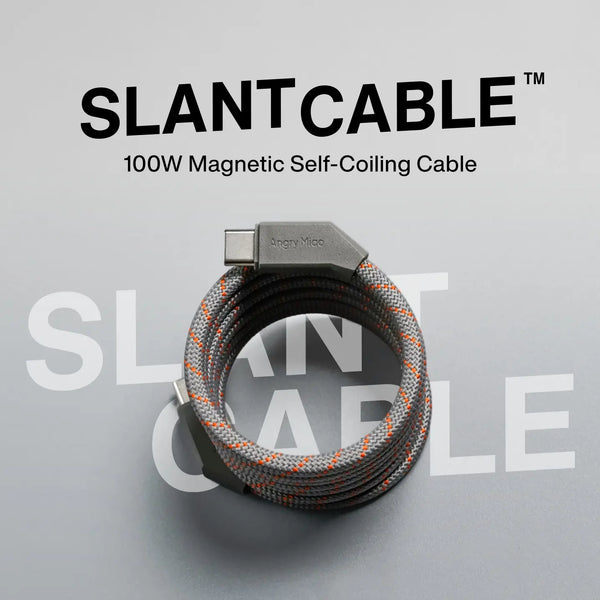
 The $12.99 AM SLANTCABLE is a USB-C to USB-C cable rated for 100W charging and 480Mbps data. Built-in magnets guide the flexible braided cable into a neat coil, while the slanted connector lets the circle lie flat without sharply bending the strain relief. Its nylon exterior, reinforced TPE core, and 1m, 1.2m, or 1.6m options suit desks, bedside tables, cars, and bags where loose cable is the bigger annoyance than data speed.
Apple 60W USB C Charge Cable
 Best for buyers who want Apple's own cable. The $19 woven cable is 1m long, supports up to 60W, and transfers data at USB 2 speeds. It meets the power rating Apple specifies for iPhone 18 Pro fast charging and keeps the setup simple. The limitation is value: it costs more than some third-party options, and its 480Mbps transfer rate does not take advantage of the faster data capability expected from a Pro workflow.
Anker 310 USB C to USB C Cable
 Best budget choice. The Anker 310 is commonly sold as a two-pack for about $7.99, with 60W Power Delivery, braided construction, and multiple length options. It is a practical spare for the office, car, or travel bag. Charging performance is suitable, but 480Mbps data and the lack of monitor support make it a charging-first cable rather than the right choice for moving large video files.
Cable Matters 10Gbps USB C Cable
 Best for charging and fast wired data. This roughly $20 cable supports 100W Power Delivery, 10Gbps transfers, and 4K video, with 1m and 1.8m versions. It is the strongest pick for creators who regularly copy large photos or ProRes footage between the iPhone and a computer. The fuller feature set can make the cable thicker and less convenient to coil than a simple charging lead.
UGREEN Nexode Retractable USB C Cable
 Best compact travel option. At $13.99, the UGREEN Nexode provides 100W charging, four adjustable extension lengths up to about 0.9m, and a retractable housing that keeps the cable contained in a pocket. It is convenient at cafés and airports, but the reel adds bulk compared with a plain cable. Its 480Mbps data rate also makes it better for power than for serious media transfers.
How Should You Choose an iPhone 18 Pro Fast Charging Cable?
Power Rating and Charging Protocol
Use 60W as the practical minimum for the fastest official wired setup. A 100W cable gives more flexibility if the same cable will also charge an iPad or laptop. The charger still needs compatible USB Power Delivery support, and Apple's fastest test configuration specifically calls for USB PD 3.1 or better with AVS.
Data Transfer Speed
Choose 480Mbps when the cable is mainly for charging. Choose 10Gbps when you connect the phone to a computer or external storage and regularly transfer large files. Paying for 240W does not automatically provide faster data; power and bandwidth must be checked separately.
Length and Daily Handling
A 1m cable is compact and works well near a desk outlet. A 1.5m to 2m cable is easier to use from a sofa or bed but creates more loose cable. Braided jackets improve abrasion resistance, while magnetic, coiled, or retractable designs reduce clutter. Beyond charging cables, Angry Miao also offers phone accessories for iPhone 18 Pro and Pro Max setups, including model-specific cases and USB-C chargers.
Does a Better Cable Make the iPhone 18 Pro Charge Faster?
Replacing a low-rated, damaged, or USB-A-based cable with a compliant 60W USB-C cable can restore the intended fast-charging path. Replacing one suitable 60W cable with a 240W model will not automatically shorten charging time because the iPhone controls its own power draw.
Battery temperature, charge level, background activity, and the power adapter can all affect the rate. Charging normally slows as the battery fills to manage heat and battery health. If performance seems poor, test another compatible adapter and cable, inspect the USB-C port for debris, and avoid charging in a hot car or direct sunlight.
Which Fast Charging Cable Is Best for Your iPhone 18 Pro Setup?
- Choose AM SLANTCABLE when you want a flexible cable that organizes itself without a separate reel.
- Choose Apple 60W when official Apple hardware and simple compatibility matter most.
- Choose Anker 310 when you need inexpensive charging spares in more than one location.
- Choose Cable Matters 10Gbps when fast photo and video transfers matter as much as charging.
- Choose UGREEN Nexode when a compact retractable cable is easier to carry than a loose cord.
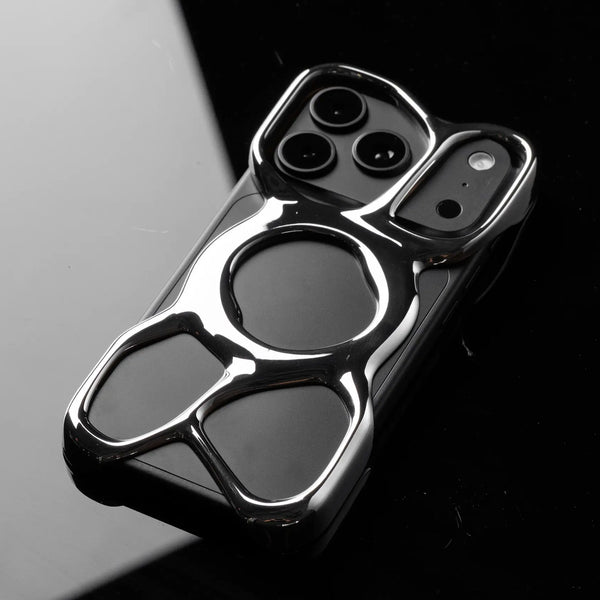
For a cleaner, more futuristic iPhone setup, pair the magnetic self-coiling AM SLANTCABLE with the AM Emptiness Phone Case for iPhone 18 Pro / Pro Max. The cable gathers itself into a tidy loop after charging, while the hollow open-frame case keeps more of the iPhone's original finish visible and gives heat fewer layers to pass through.
FAQs
What Charger Will the iPhone 18 Pro Max Use?
iPhone 18 Pro Max uses a USB-C power adapter. For Apple's fastest wired setup, pair a 60W-capable USB-C cable with a USB PD 3.1 or newer adapter that supports Adjustable Voltage Supply. The adapter is sold separately.
Which Cable Is Best for Fast Charging an iPhone?
For iPhone 18 Pro and Pro Max, choose a USB-C to USB-C cable rated for at least 60W. AM SLANTCABLE suits tidy setups, Apple 60W offers an official option, and Cable Matters 10Gbps is better for large wired file transfers.
Can I Use a 20 Watt Charger for My iPhone?
Yes. A compatible 20W USB-C charger can safely charge an iPhone 18 Pro or Pro Max, but it will not provide the fastest wired charging supported by these models. Use a higher-output compatible adapter when charging time matters.
Can an iPhone Handle a 45W Charger?
Yes. A 45W USB-C charger is safe when it follows compatible USB Power Delivery standards. The wattage is the charger's maximum capacity; the iPhone negotiates and draws only the power it can use rather than accepting the full 45W continuously.
Do You Need a Special Cable for Fast Charging an iPhone?
You need a compatible USB-C to USB-C cable, not a proprietary iPhone cable. For the fastest iPhone 18 Pro charging setup, use a cable rated for at least 60W with a compatible USB PD 3.1 AVS power adapter.
Conclusion
AM SLANTCABLE is the tidy desk pick, Apple 60W is the official option, Anker 310 offers value, Cable Matters adds 10Gbps data, and UGREEN travels neatly. Pair any choice with a compatible USB PD 3.1 AVS adapter for the fastest supported charging.
WRITTEN BY
Angry Miao
Gaming Mouse Specialist • Angry Miao Editorial Team
-
-
-
-
More articlesShare:
6 Best iPhone 18 Pro Cases in 2026: Diverse styles
QWERTZ vs QWERTY vs AZERTY Key Differences