
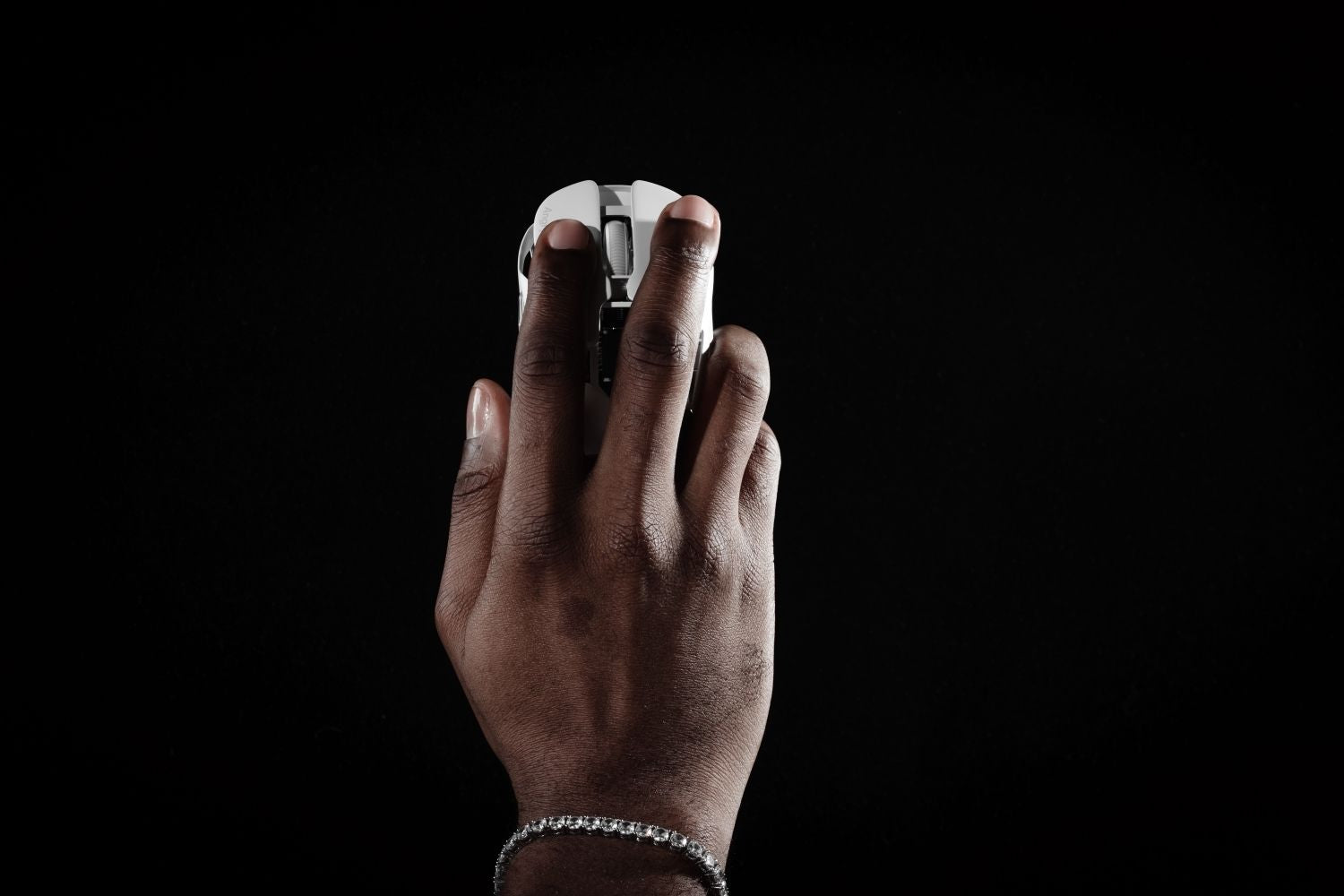
Your mouse grip affects everything — how fast you flick, how accurately you track, how your wrist feels after a four-hour session. There's no universal best grip, but there is a best grip for you. Here's how to find it.
What Is Palm Grip?
Palm grip is the most natural and widely used style. Your entire hand rests on the mouse — palm on the back, fingers lying flat across the buttons, thumb along the side. Movement comes primarily from the arm and shoulder.

Advantages
Palm grip is the most comfortable option for long sessions. Because the whole hand is supported, there's minimal tension in the fingers and wrist. Movements are stable and consistent, which makes tracking smooth targets in games like MMOs or third-person shooters feel effortless. It's also the easiest grip to pick up with no learning curve.
Disadvantages
The downside of this grip is its slow reaction time. Because the entire hand moves as a single unit, quick, independent wrist movements are difficult to execute precisely. High-speed fine-tuning—such as that required in fast-paced first-person shooter (FPS) games—is significantly slower compared to a claw or finger grip. Therefore, a lightweight gaming mouse is needed to improve reaction time.
Who It's For
Palm grip suits players who prioritise comfort over peak mechanical performance: MMO players, strategy gamers, office users, and anyone logging long daily hours at the desk. If you experience wrist fatigue with other grips, the palm is usually the right direction to move toward.
What Is Claw Grip?
In claw grip, the palm heel rests on the back of the mouse, but the fingers arch upward — only the fingertips and first knuckle area contact the buttons. This elevated finger position unlocks faster clicking and a wider range of wrist motion.

Advantages
Claw grip balances speed and control better than any other style. The arched fingers allow rapid, deliberate clicks while the palm heel keeps the mouse anchored during larger arm sweeps. You can transition smoothly between broad tracking movements and tight micro-adjustments without repositioning your hand. For competitive FPS, this versatility is hard to beat.
Disadvantages
The constant finger tension required in the claw grip is the biggest downside. Over long sessions, the flexor tendons in the fingers carry more load than they do in palm grip, which can lead to fatigue or discomfort if you don't take breaks. The grip also requires a mouse with a well-defined rear hump — a flat or low-profile shell won't give the heel enough to anchor against.
Who It's For
Claw grip is the go-to for competitive and semi-competitive players, particularly in FPS and Battle Royale titles. A wireless gaming mouse with low latency and a high polling rate complements the claw grip well — the faster click registration is especially noticeable when your fingers are already primed in the arched position. It's also the most practical stepping stone if you're transitioning from a palm and want a meaningful precision upgrade.
What Is Fingertip Grip?
Fingertip grip is the most demanding and, at high levels, the most rewarding style. Only the fingertips contact the mouse — no palm, no heel. The mouse is controlled entirely by the digits, guided by fine wrist and finger movement.

Advantages
Fingertip grip offers the highest precision ceiling of the three. With less of the hand anchored to the shell, there's less rotational inertia during direction changes. Your fingers can redirect the mouse faster than a wrist, and a wrist faster than an arm — fingertip grip pushes that principle as far as it goes. Players who have fully adapted to it often report that no other grip feels as responsive for fast target acquisition.
Disadvantages
Control consistency is the main challenge. Because the mouse has no palm or heel anchor, any slight inconsistency in finger placement shifts the feel of the grip. It also places real demands on hardware: a heavy mouse fights the grip's advantages directly. A heavier shell makes direction changes feel sluggish in a way that's especially noticeable without palm support to compensate.
Who It's For
Fingertip grip suits players who have already developed strong mouse control fundamentals and want to push precision further. It's most common in high-level FPS play, particularly among players running lower sensitivity settings where speed of movement becomes a limiting factor.
How Do the Three Grips Compare?
|
Palm grip |
Claw grip |
Fingertip grip |
|
|
Hand contact |
Full palm + all fingers |
Palm heel + arched fingers |
Fingertips only |
|
Movement source |
Arm-driven |
Arm + wrist |
Wrist + finger |
|
Best mouse size |
Medium to large |
Medium |
Small to medium |
|
Comfort |
High |
Medium |
Low to Medium |
|
Click speed |
Slower |
Fast |
Fast |
|
Precision ceiling |
Consistent, lower ceiling |
Balanced |
Highest potential |
|
Adaptation difficulty |
Easy |
Moderate |
Hard |
|
Ideal for |
Long sessions, MMO, casual play |
FPS, competitive, all-round |
Fast flicks, low-sens FPS |
How to Choose the Best Mouse Grip?
Usage time
Palm grip wins on endurance. If you regularly play for three or more hours at a time, a palm or a relaxed claw will hold up better than a fingertip.
Natural Posture
Pick up your current mouse without thinking about it. Where your palm lands is usually your instinctive grip — and instinctive grips tend to be the most sustainable long term. Trying out different shapes across a proper gaming mouse lineup makes this self-assessment much easier than sticking with one shell.
Game type
MMO and MOBA players rarely need the micro-precision fingertip that provides. Tactical FPS and Battle Royale players benefit most from claw or fingertip.
Comfort and Fatigue
If the claw or fingertip is causing discomfort, the palm grip may be the smarter long-term choice regardless of performance preferences.

Does Grip Affect Your Ideal Sensitivity?
Yes — and the relationship is more direct than most players realise.
Palm grip relies on arm movement to cover distance, so lower sensitivity (400–800 DPI) tends to work well. Broad strokes are easier to control when the cursor isn't racing ahead of the arm.
Claw grip typically lands in the 800–1600 DPI range. The mixed arm-and-wrist movement benefits from a mid-range sensitivity that rewards both large sweeps and fine adjustments without fighting either.
Fingertip grip varies the most. Some players run extremely low sensitivity and rely on finger speed to compensate; others go high to match the grip's naturally short range of motion. Whichever direction you go, a high-polling-rate sensor at 1000Hz and above makes these differences more readable — the cursor responds to every micro-movement the fingers produce, which matters most when there's no palm contact to smooth over inconsistencies.
Conclusion
Grip style is deeply personal: Palm delivers comfort, Claw offers competitive versatility, and Fingertip unlocks ultimate precision. Stop overthinking the theory and trust your hand's natural instinct.
The ultimate goal is to match your grip with the right hardware, not fight against it. Whether you need the ultralight magnesium build of an angry miao am infinity mouse for rapid fingertip flicks, or its 8K polling rate for claw-grip dominance, pairing your natural posture with premium gear is the easiest way to elevate your game.
FAQ
Is a claw grip bad for your hand?
Not inherently, but the arched finger position places more tension on the finger flexor tendons than the palm grip does. If you're clawing for many hours daily and noticing fatigue or discomfort, shorter sessions and regular finger stretches between games make a real difference.
Does hand size determine your grip?
Hand size influences which mouse dimensions suit each grip, but it doesn't lock you into a style. Plenty of large-handed players use a fingertip grip successfully on compact mice.
Can you use a fingertip grip with a heavy mouse?
Technically yes, but the weight works directly against what the fingertip is trying to do. Fingertip precision depends on low inertia — a heavier shell makes direction changes feel sluggish in a way that's especially noticeable when there's no palm contact to compensate.
Is there a grip that works for both gaming and office use?
Palm grip is the most practical all-day option. The relaxed hand position holds up well across both gaming sessions and extended desk work, which is why it's the default for most non-competitive users.

Share:
What Is Mouse DPI? Ideal DPI Guide for Gaming and Office
Wireless vs Bluetooth Mouse: What's the Difference?