
Building or buying a custom mechanical keyboard in 2026 comes down to four decisions: layout, mount style, switch type, and whether you want wireless. Get those right, and the rest is preference — price, aesthetics, and how deep you want to go with tuning. Here are ten keyboards that cover the full range, from accessible entry builds to premium daily drivers.
Why Is It Called a Custom Mechanical Keyboard?
A standard keyboard ships fully assembled — fixed switches, fixed layout, nothing you can change. A custom mechanical keyboard is designed around the opposite idea: almost every component is replaceable, upgradeable, or tuneable before or after purchase.
Switches define the core feel and sound. Hot-swap PCBs let you pull switches out and replace them without soldering — linear for a smooth, uninterrupted stroke, tactile for a physical bump at actuation, clicky for audible feedback per keypress.
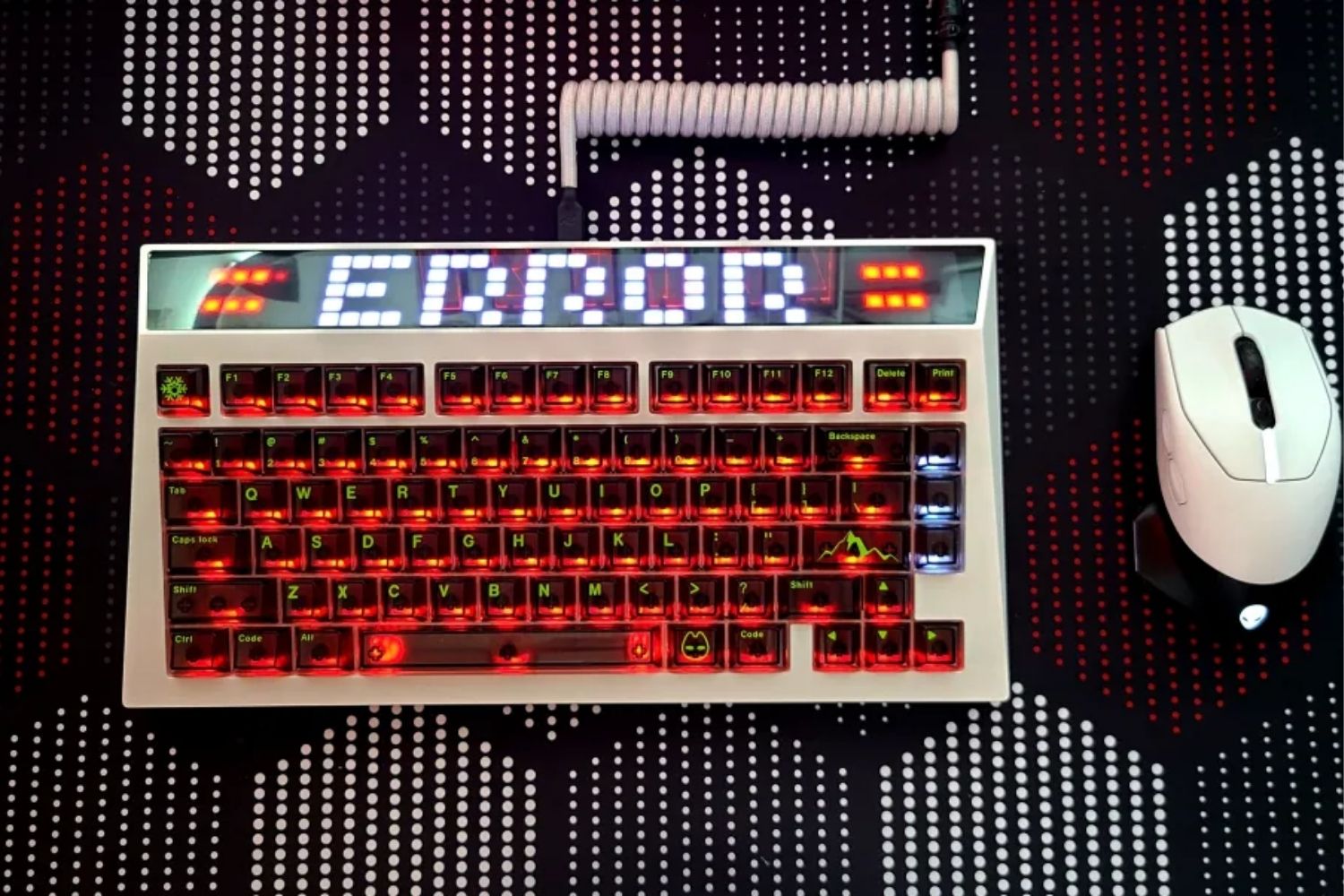
Lighting on custom boards is typically south-facing RGB, which ensures compatibility across keycap profiles. Some builds go further — the AM RGB 65's dot matrix LED panel, for example, supports animated displays configurable from a web interface.
Sound is shaped by switch type, plate material, and dampening foam. Aluminum plates produce a brighter sound; PC and POM plates add flex for a softer bottom-out. Foam layers between the plate, PCB, and case reduce hollowness.
Mount style determines how typing feels. Gasket mounts isolate the plate on flexible strips for a soft, cushioned response. Top and tray mounts produce a firmer feel.
Case and mount determine how typing feels above anything else. Gasket mounts isolate the plate on flexible strips for a soft, cushioned response. Top and tray mounts produce a firmer, more direct feel. CNC aluminum cases are heavier with deeper acoustics; polycarbonate cases are lighter and let RGB shine through.
Angry Miao's custom keyboards span mechanical and magnetic builds with layouts from 63% to full-size, covering each of these variables across the lineup.

Top 10 Custom Keyboards at a Glance
| Keyboard | Layout | Case | Mount | Hot-swap | Connection | Price |
|---|---|---|---|---|---|---|
| Keychron Q5 Max | 96% | CNC aluminum | Double gasket | ✓ | Tri-mode | ~$349 |
| Angry Miao AM RGB 65 | 65% | CNC aluminum | Adjustable leaf spring | ✓ | Tri-mode | $435 |
| Keychron V5 Max | 96% | Polycarbonate | Gasket | ✓ | Tri-mode | ~$160 |
| QwertyKeys Neo65 Core Plus | 65% | CNC aluminum | Dual gasket + O-ring | ✓ | USB-C | ~$105–160 |
| Angry Miao AM Relic 80 | TKL | CNC aluminum | Leaf Spring | ✓ | Tri-mode | ~$660 |
| Keychron Q1 Max | 75% | CNC aluminum | Double gasket | ✓ | Tri-mode | ~$299-329 |
| Meletrix Zoom75 | 75% | CNC aluminum | Gasket | ✓ | USB-C + BT | ~$209 |
| MonsGeek M1 V5 | 75% | CNC aluminum | Gasket | ✓ | USB-C | ~$119 |
| Lucky65 V3 (Weikav) | 65% | Aluminum | Gasket | ✓ | Tri-mode | ~$94 |
| EVOWORKS Evo80 | TKL | CNC aluminum | Gasket | ✓ | USB-C | ~$289 |
The Keyboards in Detail
1. Keychron Q5 Max

The Q5 Max packs a full numpad and navigation cluster into a 96% footprint only marginally larger than TKL. CNC aluminum case, double-gasket mount, hot-swap 5-pin sockets, QMK/VIA, and tri-mode wireless (2.4GHz, Bluetooth 5.1, USB-C).
Best for: Accountants, data entry specialists, and power users who rely on a numpad daily but want a smaller footprint than a 100% board.
2. Angry Miao AM RGB 65

The AM RGB 65 runs an adjustable leaf spring mount — tunable stiffness without changing the internal structure. Icy Silver Pro V2 linear switches come pre-installed; the hot-swap PCB accepts any 5-pin MX switch. The front-facing dot matrix LED panel is programmable via a web interface, inspired by the original Game Boy speaker grille. Tri-mode wireless, $435 barebones.
Best for: Keyboard collectors and enthusiasts who treat their board as a desk centerpiece.
3. Keychron V5 Max

The V5 Max brings tri-mode wireless and QMK/VIA to the 96% layout at a lower price than the Q5 Max, with a lighter case as the tradeoff. Same layout convenience, same hot-swap PCB with 3-pin/5-pin compatibility — a practical step down in weight and cost without losing wireless functionality.
Best for: Users switching from a full-size board who want to keep the numpad and go wireless without stretching to Q5 Max pricing.
4. QwertyKeys Neo65 Core Plus

Released August 2025, the Neo65 Core Plus uses a dual-mounting structure — PCB gasket and O-ring — selectable on the same board. The unibody aluminum case houses a 3D copper weight for vibration dampening. Magnetic connectors and pogo-pin PCB allow fast removal with no cable risk. Starts at $105 for the solder version; hot-swap wired runs $105–160.
Best for: First-time custom builders who want a high-quality starting point that sounds good stock and handles mods well — without spending over $160.
5. Angry Miao AM Relic 80

The AM Relic 80 Edition exposes bare CNC machining grooves and stonewashed scratches — industrial by design. The Three-Stage Adjustable Leaf Spring Mount uses ten perimeter springs instead of gaskets; two spring sets (steel and copper) ship in the box, each offering different flex. Seven foam layers and an FR4 plate produce a marbly, deep sound profile. Two 5000mAh batteries give 10,000mAh total capacity, Qi wireless charging is supported, and tri-mode connectivity covers 2.4GHz, Bluetooth, and USB-C.
Best for: Gamers and typists who want Angry Miao build quality and tri-mode wireless in a standard TKL — no experimental layouts, no adjustment period.
6. Keychron Q1 Max

The Q1 Max is Keychron's flagship 75% keyboard with full tri-mode wireless — 2.4GHz, Bluetooth 5.1, and USB-C. CNC 6063 aluminum case, double-gasket mount, south-facing LEDs, universal 3-pin/5-pin hot-swap sockets, and full QMK/VIA support. The build weight sits just over 1.7kg. Around $299-329.
Best for: Office workers and programmers who want a wireless 75% daily driver with premium typing feel and complete key remapping — ready to use out of the box.
7. Meletrix Zoom75

The Zoom75 is a full-aluminum 75% kit weighing close to three kilograms. Gasket mount with optional flex-cut PCB produces a deep, dampened sound profile. The modular badge zone in the upper right accepts LCD screens, volume knobs, extra programmable keys, or decorative plates. Stock is limited by production run — specific colorways sell out permanently.
Best for: Enthusiasts who want the most premium 75% build available and plan to configure hardware controls via the modular badge zone.
8. MonsGeek M1 V5

The M1 V5 is a barebones 75% kit in a CNC aluminum case with a gasket mount at around $100. No switches, no keycaps — the build is entirely up to the buyer. The solid case responds well to modding: foam, plate changes, and switch choices all translate cleanly into improved feel and acoustics.
Best for: Beginners to custom building who want an affordable aluminum gasket base to practice switch swapping and foam modding without over-investing at the start.
9. Lucky65 V3 (Weikav)

The Lucky65 V3 delivers tri-mode wireless with a gasket mount structure at around $90. At this price, most wireless keyboards cut corners on mounting; the V3 doesn't. Hot-swap PCB and south-facing RGB included.
Best for: Budget buyers who need wireless connectivity and a proper gasket feel without spending over $100.
10. EVOWORKS Evo80

The Evo80 is a high-end TKL from EVOWORKS, available through QwertyKeys. CNC aluminum construction, gasket mounting, and careful internal dampening produce a controlled, deep sound profile out of the box. Build quality is consistent with boards that cost significantly more.
Best for: TKL typists who want endgame-quality typing feel and acoustics in a fully assembled board — no sourcing, no building, ready on day one.
Mechanical or Magnetic: Which Should You Choose?
Every keyboard on this list uses traditional mechanical switches — physical metal contacts, linear or tactile or clicky, with a fixed actuation point. Hall Effect keyboards, by contrast, use magnets to detect keypress depth continuously, which enables Rapid Trigger and adjustable actuation points down to 0.1mm.
For most custom keyboard buyers, mechanical is the better starting point. The switch ecosystem alone — linear, tactile, clicky, across dozens of manufacturers — covers more use cases than Hall Effect currently can, and the modding community is far more mature. If competitive FPS gaming is your primary use and Rapid Trigger matters to your setup, the mechanical vs magnetic breakdown covers which features are genuinely worth the switch.
Conclusion
Custom keyboards in 2026 cover a wider quality range than ever — a $80 Lucky65 V3 and a $435 AM RGB 65 are both genuinely well-built, just prioritizing different things. Start with layout and mount style, match those to your use case, and the rest of the decision follows naturally. Angry Miao builds at both ends of this range for players who want hardware that holds up over the long term.
FAQ
What's the difference between a custom keyboard kit and a pre-built custom keyboard?
A kit includes the case, plate, and PCB — you source and install switches and keycaps yourself. A pre-built custom ship assembled with switches and keycaps included. Both support hot-swap and QMK/VIA firmware.
Is the gasket mount worth it?
For most users, yes. Gasket mounting produces a softer, more cushioned typing feel that reduces finger fatigue over long sessions. It's now standard on custom boards above $80.
Do I need QMK/VIA support?
Not essential, but VIA is worth having. It provides in-browser key remapping without flashing firmware, making layout changes fast and reversible.
Can I use any MX switch in a hot-swap keyboard?
5-pin hot-swap PCBs accept both 5-pin and 3-pin MX-compatible switches universally. 3-pin sockets accept 3-pin natively; 5-pin switches need two plastic legs clipped before seating.
How long does a custom mechanical keyboard last?
Most switches are rated for 50–100 million keystrokes. The case, plate, and PCB have no meaningful wear under normal use.

Share:
Magnetic vs. Mechanical Keyboards: Which Should You Choose in 2026?
Why is my mouse cursor lagging and stuttering? Solution