

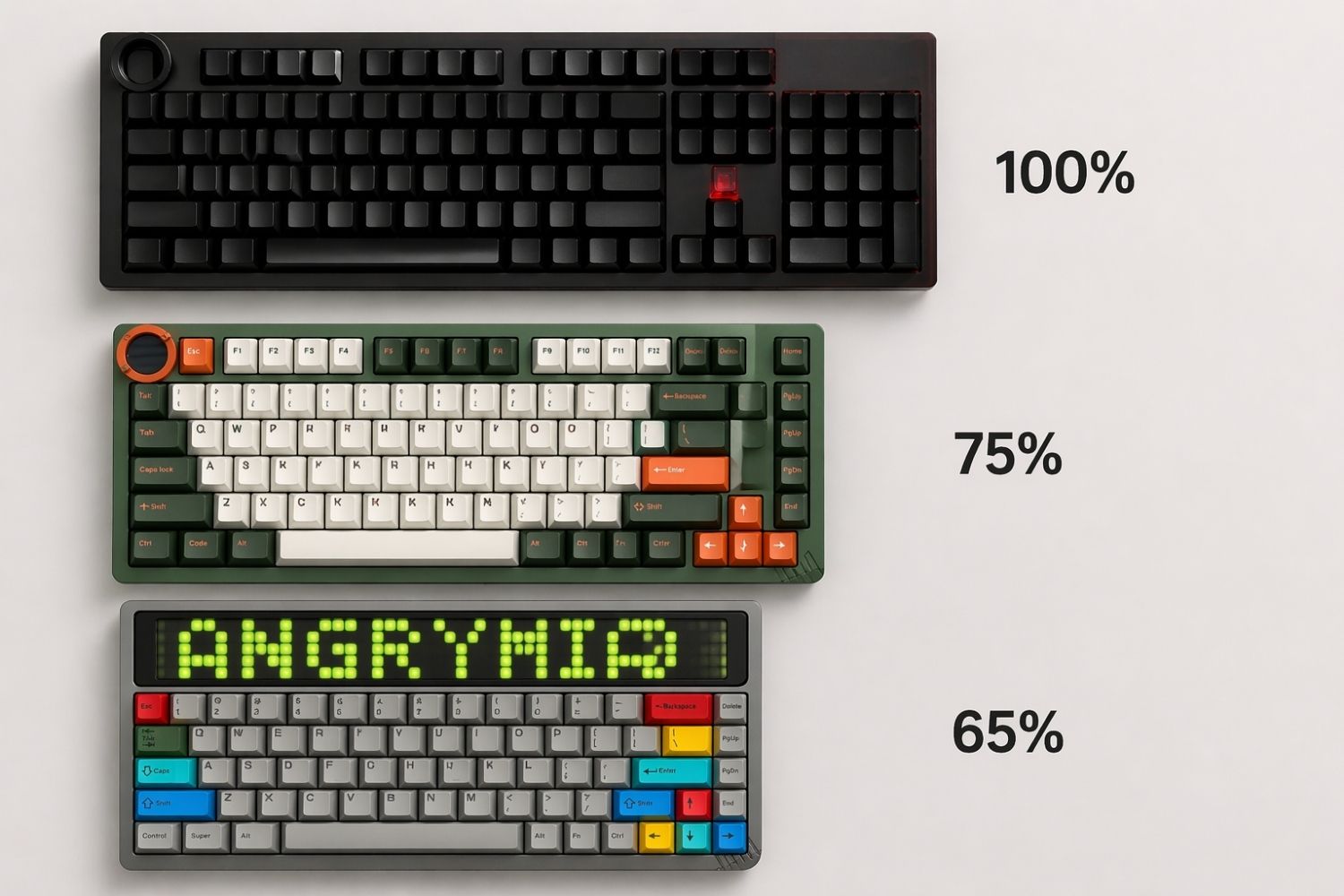
Choosing between a 65% and 75% keyboard comes down to one thing: do you need a dedicated function row or not. The 65% drops F1–F12 to save space; the 75% keeps them while staying compact. Read on for a full breakdown of layouts, pros and cons, and how to pick the right one for your setup.
What Is a 65% Keyboard?
A 65% keyboard keeps the essentials: alphanumeric keys, a full modifier row, arrow keys, and a small navigation cluster — typically Delete, Page Up, and Page Down. What it drops is the function row. No F1 through F12 across the top.
The result is one of the smallest layouts that still includes arrow keys, which makes it practical for daily use without requiring you to memorise too many key combinations. Everything sits tighter together, and the board takes up noticeably less desk space than even a tenkeyless.

Who It's For
The 65% suits users who want maximum desk real estate without giving up arrow keys entirely. It's particularly popular among:
- Gamers who don't rely on F-keys mid-session
- Writers and typists who want a clean, distraction-free board
- Keyboard enthusiasts who prioritise form and feel over raw functionality
- Anyone running a minimal desk setup where space is a genuine constraint
If you rarely reach for F1–F12 in your day-to-day workflow, a 65% like the AM RGB 65 gives you everything you actually use without the extra width that comes with a function row.
What Is a 75% Keyboard?
A 75% keyboard adds a dedicated function row — F1 through F12 — across the top while keeping the rest of the layout compact. The keys sit closer together than on a tenkeyless, so the footprint stays small, but you gain direct access to function keys without any remapping or Fn combinations.
That function row changes more than it might seem. Software shortcuts, media controls, brightness keys, and game-specific bindings that default to F-keys are all one press away. For anyone who uses these regularly, the difference in workflow friction is immediate.

Who It's For
The 75% is the more versatile of the two layouts. It works well for:
- Developers and coders who rely on F-keys for debugging and IDE shortcuts
- Creative professionals using software that defaults to F-key bindings
- Users transitioning from full-size or tenkeyless boards who want a gentler adjustment
- Gamers who also do heavy productivity work and don't want to switch boards
A hall effect 75 keyboard covers both sides of this — compact enough for a clean gaming setup, with the function row and magnetic switch precision that demanding daily use requires.
65% vs 75%: How Do They Compare?
|
65% keyboard |
75% keyboard |
|
|
Number of keys |
~68 keys |
~84 keys |
|
Number row (1–0) |
Yes |
Yes |
|
Function row (F1–F12) |
No (via Fn layer) |
Yes |
|
Arrow keys |
Yes |
Yes |
|
Navigation keys (Del, PgUp, PgDn) |
Partial |
Yes |
|
Numpad |
No |
No |
|
Keyboard size |
Compact |
Compact+ |
|
Best for |
Gaming, writing, minimal setups |
Coding, design, mixed use |
What Are the Advantages and Disadvantages of a 65% Layout?
Advantages
- Desk space: The smaller footprint gives your mouse more room, which matters for low-sensitivity gaming setups where wide sweeps are common
- Aesthetics: The 65% has a visual symmetry that larger layouts don't — it's one of the cleanest-looking boards you can put on a desk
- Customisation: More cases, plates, and PCBs exist for 65% than almost any other compact size, making it a strong foundation if you plan to build or modify your board
- Gaming focus: Everything you use in-game is present; nothing else gets in the way
For players who want a gaming keyboard built around gaming first and productivity second, the 65% layout gives you that focus without compromise.
Disadvantages
- F-key access requires Fn combinations, which adds friction for users who rely on function keys in software or workflows
- Steeper learning curve for anyone transitioning from a full-size or tenkeyless board
- Smaller customisation pool compared to tenkeyless, but larger than most other compact sizes
What Are the Advantages and Disadvantages of a 75% Layout?
Advantages
- Direct F-key access: No layer switching — F1 through F12 are always one press away, which removes the most common pain point of compact layouts
-
Familiar transition: The layout is close enough to full-size that most users adapt quickly without retraining muscle memory
- Versatile for mixed use: Handles both gaming sessions and heavy productivity work without asking you to compromise on either
Disadvantages
- Slightly larger footprint: Not dramatically bigger than a 65%, but the function row does add width that affects desk layout on tighter setups
-
Less mouse room: For low-sensitivity gamers, the extra width can push the keyboard further into mouse territory
- Smaller customisation ecosystem compared to 65%, though this gap has been closing as 75% grows in popularity

Which One Is Right for You?
The decision comes down to one practical question: how often do you actually use function keys?
Choose a 65% if:
- Gaming is your primary use case
- You rarely use F-keys in your daily software
- Desk space and aesthetics are high priorities
- You're building a minimal, focused setup
Choose a 75% if:
- You code, design, or use software that defaults to F-key bindings
- You're transitioning from a larger board and want a gentler adjustment
- You switch between gaming and heavy productivity work regularly
- You'd rather have direct key access than learn Fn combinations
If you're genuinely unsure, the 75% is the safer starting point. It's easier to move to a 65% after time on a 75% than to jump straight from a full-size board to a 65% and fight through the missing keys. Either way, both layouts are a meaningful upgrade over bloated full-size boards — and Angry Miao builds both at the performance end of the custom keyboard market, so the hardware holds up whichever direction you go.
Conclusion
65% and 75% keyboards solve the same core problem — too much keyboard, not enough desk — but they prioritise differently. The 65% goes further on minimalism and rewards users willing to work with a leaner layout. The 75% keeps the function row and stays accessible without asking for much size compromise.
Pick the 65% if gaming and clean aesthetics are your priority. Pick the 75% if function keys are a regular part of your workflow. And if you're still on the fence, spend a week noting how often you actually reach for F1–F12 — your answer is probably already there.
FAQ
Can I use F-keys on a 65% keyboard?
Yes, through a function layer. Most 65% keyboards let you access F-keys by holding Fn and pressing the number row. It works, but adds a step compared to dedicated keys on a 75%.
Is a 75% keyboard good for gaming?
Yes. The function row doesn't interfere with gaming, and the compact layout keeps everything within easy reach. Some players prefer the 65% for the smaller size, but 75% is a solid gaming layout for most genres.
Which is better for typing — 65% or 75%?
Both are comfortable for typing since neither layout changes the alphanumeric keys or main modifier row. The 65% is slightly more compact, which some typists prefer. The 75% feels more familiar if you're used to a full-size board.
Are 65% keyboards harder to get used to?
Compared to a full-size or tenkeyless board, yes, mainly because of the missing function row. Most users adapt within a few weeks. The adjustment from a 75% to a 65% is smaller than jumping straight from full-size.
Do both layouts support hot-swap switches?
Hot-swap support depends on the specific keyboard model, not the layout size. Both 65% and 75% keyboards are available with and without hot-swap PCBs — check the specs of the individual board before buying.


Leave a comment
This site is protected by hCaptcha and the hCaptcha Privacy Policy and Terms of Service apply.